🥳 Skip the subscription. Pay $299 once for lifetime access— See lifetime plans
🥳 Skip the subscription. Pay $299 once for lifetime access—

7 MIN READ
Discovery
Discovery
From 47,000 Creators to a 50-Person Shortlist in 5 Minutes
From 47,000 Creators to a 50-Person Shortlist in 5 Minutes
From 47,000 Creators to a 50-Person Shortlist in 5 Minutes
Sections
Build your first creator list on Solo, $29 a month.

Blog in Short ⏱️
Blog in Short ⏱️
A quick glance at the highlights—perfect for when you're short on time.
A quick glance at the highlights—perfect for when you're short on time.
Typing a niche into a search bar returns 50,000 creators sorted by follower count. By page 5, you're staring at bots and dropshippers. The fix isn't a better tool — it's a better search method.
Here are the key takeaways:
Filter stacking = applying 5 filters in the right order inside Impulze Discovery
It collapses 10,000+ candidates → ~40 quality matches in about 5 minutes
The single highest-leverage filter is Audience Credibility — it catches bot-padded creators that Engagement Rate alone misses
You're not buying the creator — you're buying their audience. Filter who's watching, not just who's posting
Skip the stack for brand launches and ambassador programs where reach beats fit
You open Creator Discovery in Impulze. You type "fitness." You hit search.
A few seconds later — 47,000 creators tagged "fitness," sorted by follower count. The top 30 are mega-creators you can't afford. Pages 5–50 are bots, dropshippers, and creators whose audiences are 80% in countries you don't sell to. You scroll for two hours, save 12 candidates, send DMs to 8, and get 1 reply.
Every brand in your category is running that same lazy search and getting the same 12 candidates. The shortlists overlap. The exclusivity battles get expensive. The best creators raise their rates because they're getting pitched five times a week.
Filter stacking flips this. You apply 5 filters in the right order, inside the same Discovery page, and you walk out with a 50-creator shortlist that's already pre-vetted on the variables you'd normally check manually for each profile.
This blog shows you the exact stack — with a real DTC skincare campaign as the case study. By the end you'll have a workflow you can repeat for every campaign you run.
Case study: 9,800 → 52 creators in 5 minutes
The brand: A US-based DTC skincare brand selling a hydration serum to women 25–34.
Budget for the first 5 creators: $4,500 total.
Goal: A ranked shortlist of 50 micro-influencers who match the audience profile by Friday.
Here's the same workflow, minute by minute, inside Impulze Discovery.
Minute 1 — Niche + bio keyword
Don't just type "skincare." Layer 2–3 bio keywords so you're matching how creators actually describe themselves. Hit the Magic Keywords button next to the search bar and Impulze surfaces related hashtags and bio keywords.
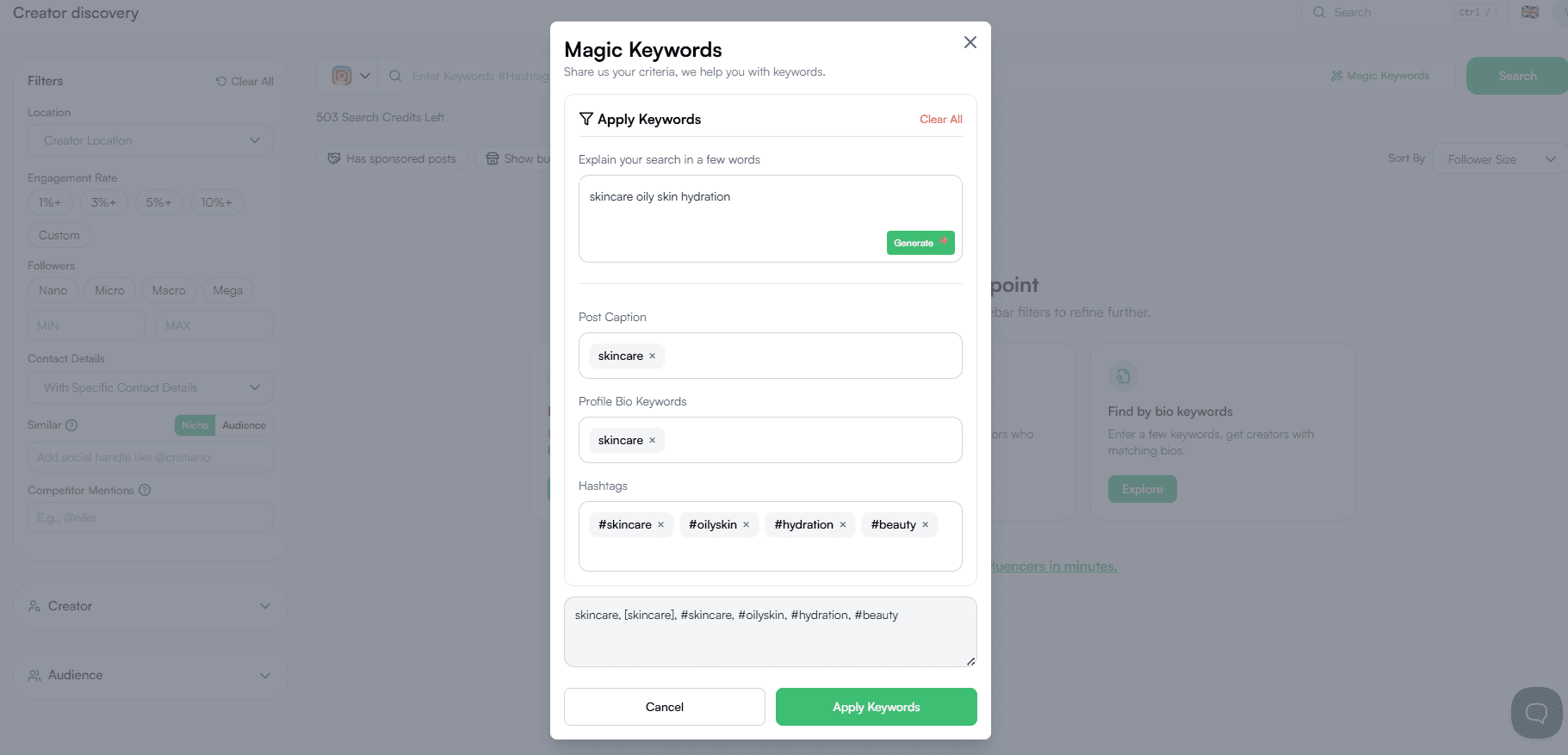
Result: ~9,800 creators. Down from 47,000 with three words.
Minute 2 — Followers band
Open the Followers filter. Set Min/Max: 15K–150K.
For SMB budgets the sweet spot is micro-to-mid-tier — small enough to afford, big enough to move product. Don't go too tight on the first pass. If 15K–150K returns nothing, widen it. If it returns 5,000 creators, narrow it.
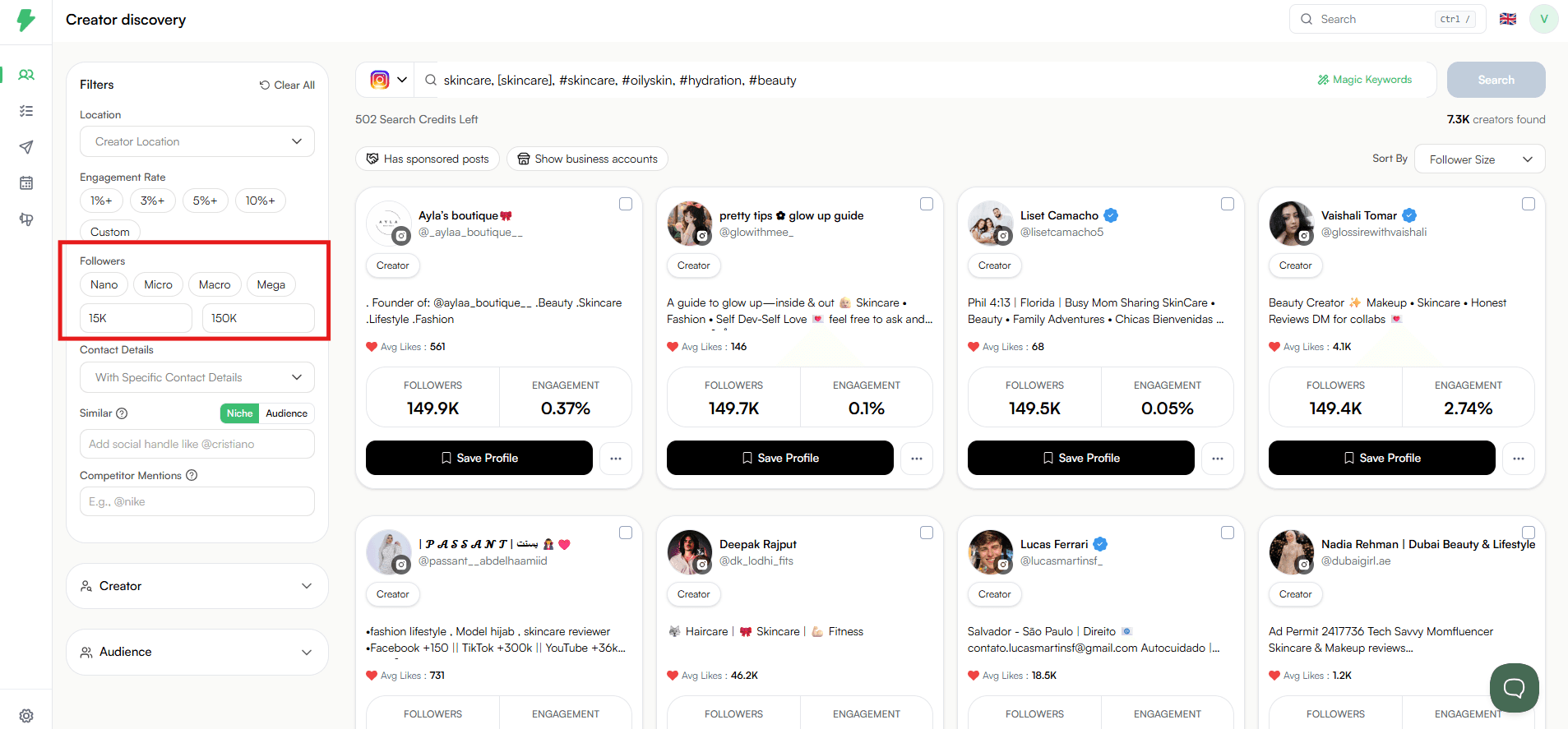
Result: ~7,300 creators. Already a more honest pool.
Minute 3 — Audience demographics
This is where most marketers under-filter. You're not buying the creator — you're buying their audience.
Expand the Audience section and set:
Audience Age: 20–40 dominant
Audience Gender: Female 60%+
Audience Locations: United States
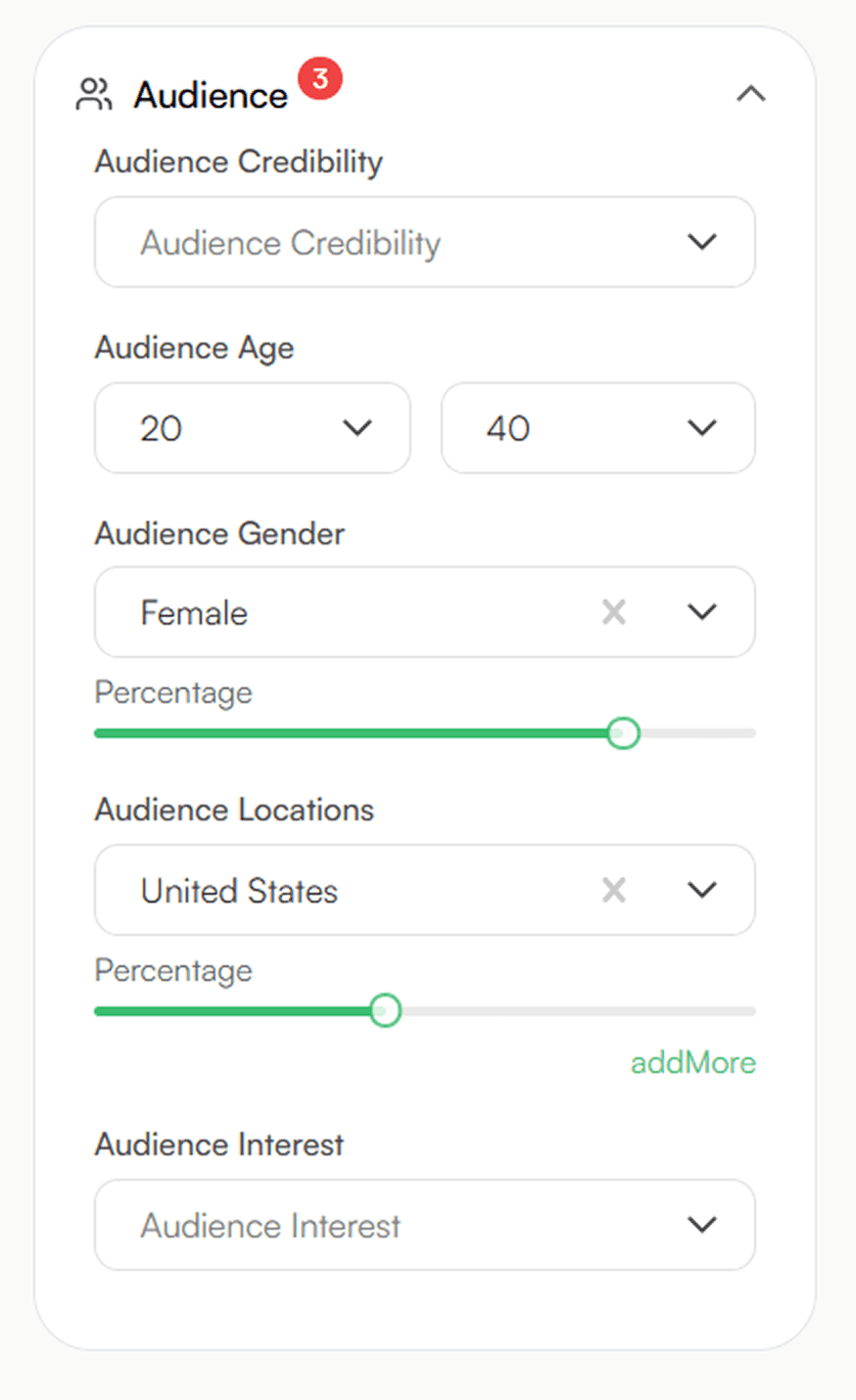
Result: ~1000 creators. Every one of them has the right viewers — even if half their feed is unrelated content.
Minute 4 — Quality layer (the fraud killer)
Two filters, applied together:
Engagement Rate ≥ 3% (use the chip in the top filter strip)
Audience Credibility ≥ High (inside the Audience section)
Engagement Rate alone catches inflated likes. Audience Credibility catches inflated audiences — bot followers, mass-followers, suspicious accounts. You need both, because creators who fake one usually don't bother faking the other.
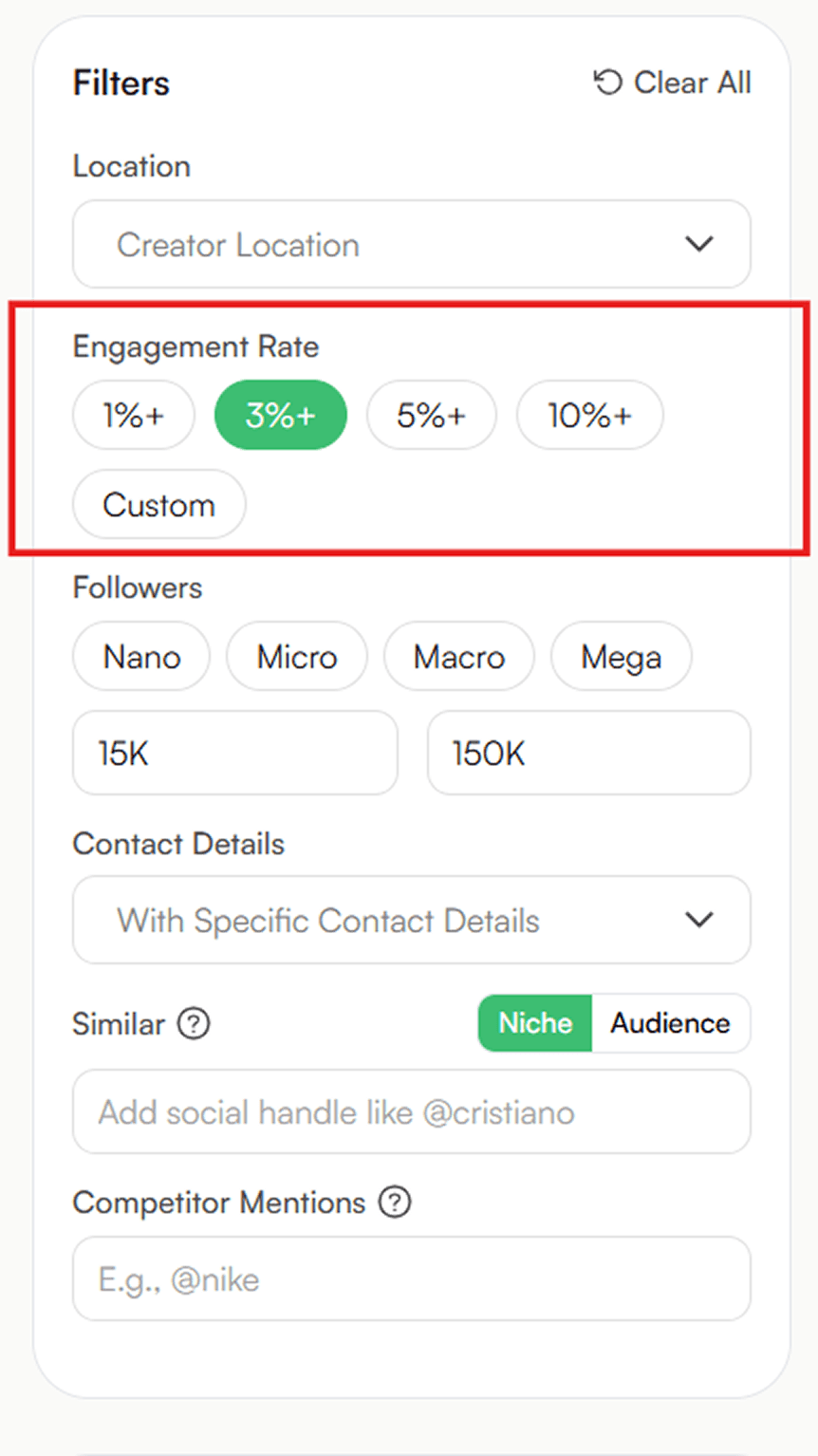
Result: ~75 creators. Every single one is real-engagement, real-audience.
Also read: How to Spot a Fake Influencer Before You Pay: The 4-Type Audience Breakdown
Minute 5 — Fit layer
Last pass
Audience Interest: "Beauty & Cosmetics"
Audience Interest separates "right audience, generic content" from "right audience, on-brand content."
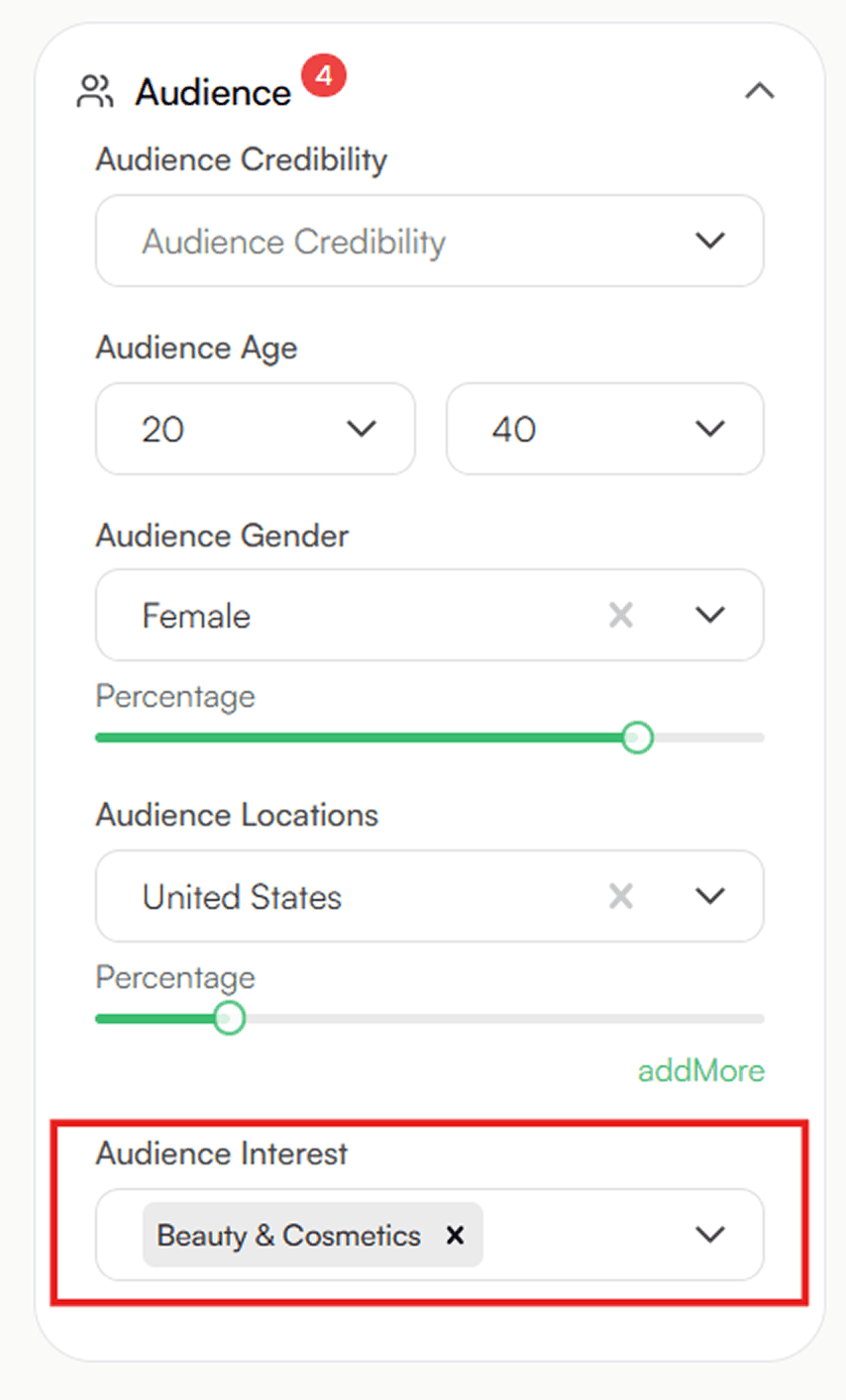
Result: ~40 creators. Done.
What you just built
Total time: about 5 minutes. Total clicks: ~12.
Your final 40-creator shortlist is:
In the right country
In the right age + gender bracket
Hitting your engagement floor
Not running a bot audience
Already interested in beauty
Validated by a competitor
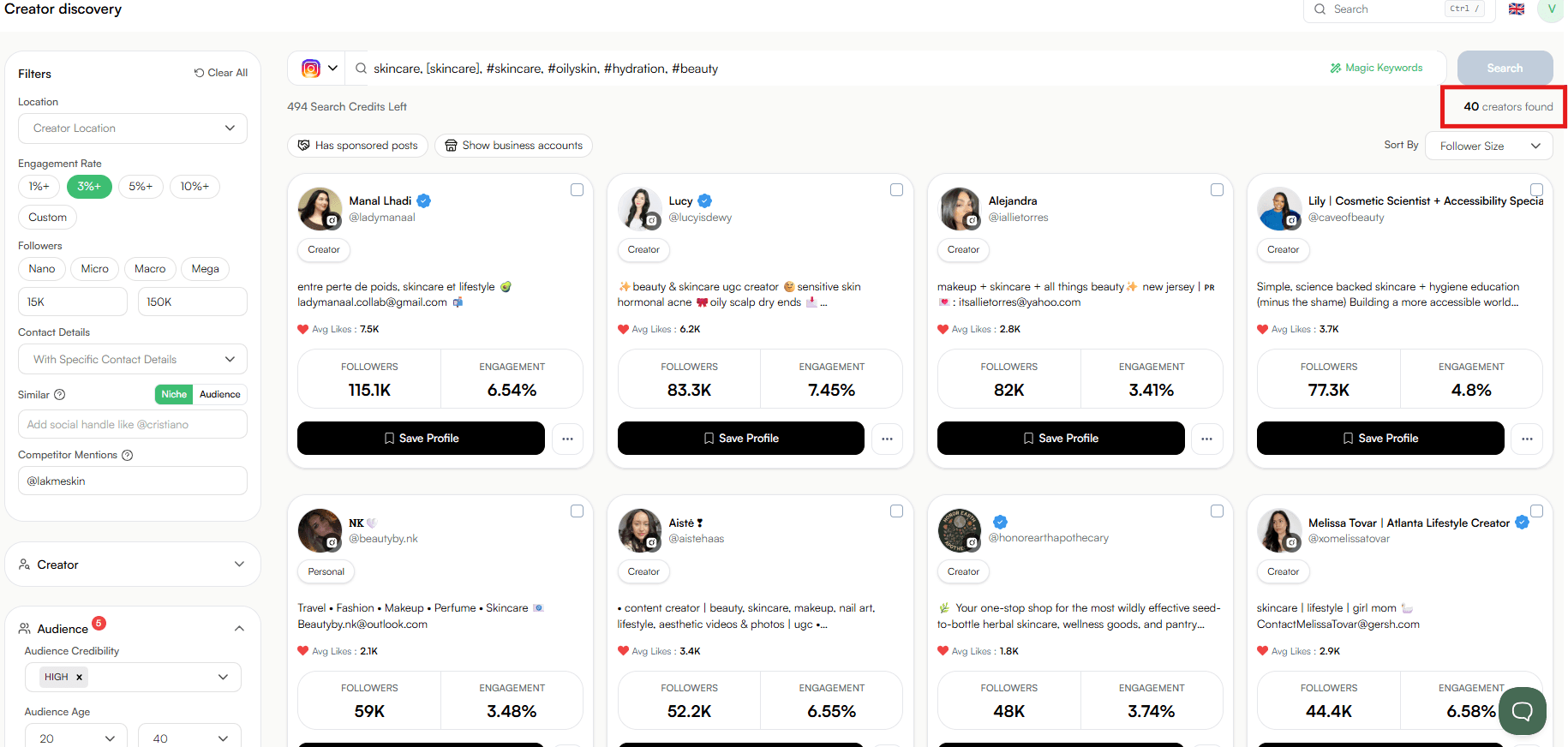
You can send DMs to all 40 today.
For comparison: the lazy "search beauty + sort by followers" workflow would have given you the same 12 mega-creators every skincare brand is pitching this month — at rates that don't pencil at SMB scale.
Run this exact stack on your niche — start free on Impulze →
The 5 filters that actually matter
You just saw all 5 in action. Here they are decoupled, so you can adapt the stack to your niche.
1. Niche keyword + bio match
Type your niche, layer 1–2 bio keywords. "Fitness" returns 47K. "Fitness + macro coach in London" returns 800. Use Magic Keywords to find related terms you didn't think of.
2. Follower band
Match it to your budget. For SMB: 10K–250K is the usual sweet spot. Start wider than you think and narrow once you see the distribution.
3. Audience demographics (Age, Gender, Location)
The under-used filter that decides whether your campaign converts or burns. Lock to your top 2–3 markets. Don't assume the creator's geo matches the audience's geo — it often doesn't.
4. Quality stack (ER + Audience Credibility, always together)
The single most important pairing in this whole article. ER ≥ 3% for mid-tier, 5% for micro, 6% for nano. Audience Credibility ≥ High. If a creator survives both, they're not faking metrics.
5. Fit layer (Audience Interest)
The final narrowing pass. Audience Interest aligns the audience profile to your product. Competitor Mentions surfaces creators with proof they've worked in your category before.
Also read: How to Find Lookalike Influencers in 2026: The "One Creator = 500 More" Method
3 mistakes that ruin your shortlist
Stacking too aggressively on the first pass. If your stack returns 4 results, you've over-filtered. A good stack lands in the 30–100 range. Loosen the audience age band, raise the follower cap, or drop the third keyword.
Skipping Audience Credibility. Engagement Rate alone passes inflated creators. Always stack ER + Credibility together. This is the single change that drops campaign waste the fastest.
Ignoring the Audience section because "everyone fits in my niche." The most expensive assumption in influencer marketing. A creator's niche tells you what they post about. Their audience demographics tell you who's actually reading.
When NOT to stack filters
Filter stacking is the right workflow for most SMB use cases. But not always:
Brand launches — when you want maximum reach in the first 30 days, the lazy "top 50 by follower count" search may actually be the right call. Reach beats fit early.
Ambassador programs — building a long-term roster means you want some diversity outside your tight audience match. Don't over-filter.
Niche audiences with thin supply — if your stack returns 4 results no matter how you loosen it, your audience is genuinely small. Accept the smaller pool or expand the geo.
For everything else — performance campaigns, recurring partnerships, DTC product placement — stack the filters.
Try it on your campaign in 5 minutes
You don't need to read another article. Open Discovery, pick your niche, and run the same 5-step stack you just saw.
Inside Impulze you'll get:
Every filter the workflow needs in one screen — no tab-hopping
440M+ Instagram, TikTok, and YouTube profiles
Magic Keywords to surface niche terms you didn't think of
Audience Credibility — the highest-leverage filter most tools don't expose
Competitor Mentions to copy creators your competitors already validated
Save Profile on every result so your shortlist builds as you go
One stack. Your shortlist. Five minutes.
You open Creator Discovery in Impulze. You type "fitness." You hit search.
A few seconds later — 47,000 creators tagged "fitness," sorted by follower count. The top 30 are mega-creators you can't afford. Pages 5–50 are bots, dropshippers, and creators whose audiences are 80% in countries you don't sell to. You scroll for two hours, save 12 candidates, send DMs to 8, and get 1 reply.
Every brand in your category is running that same lazy search and getting the same 12 candidates. The shortlists overlap. The exclusivity battles get expensive. The best creators raise their rates because they're getting pitched five times a week.
Filter stacking flips this. You apply 5 filters in the right order, inside the same Discovery page, and you walk out with a 50-creator shortlist that's already pre-vetted on the variables you'd normally check manually for each profile.
This blog shows you the exact stack — with a real DTC skincare campaign as the case study. By the end you'll have a workflow you can repeat for every campaign you run.
Case study: 9,800 → 52 creators in 5 minutes
The brand: A US-based DTC skincare brand selling a hydration serum to women 25–34.
Budget for the first 5 creators: $4,500 total.
Goal: A ranked shortlist of 50 micro-influencers who match the audience profile by Friday.
Here's the same workflow, minute by minute, inside Impulze Discovery.
Minute 1 — Niche + bio keyword
Don't just type "skincare." Layer 2–3 bio keywords so you're matching how creators actually describe themselves. Hit the Magic Keywords button next to the search bar and Impulze surfaces related hashtags and bio keywords.
Result: ~9,800 creators. Down from 47,000 with three words.
Minute 2 — Followers band
Open the Followers filter. Set Min/Max: 15K–150K.
For SMB budgets the sweet spot is micro-to-mid-tier — small enough to afford, big enough to move product. Don't go too tight on the first pass. If 15K–150K returns nothing, widen it. If it returns 5,000 creators, narrow it.
Result: ~7,300 creators. Already a more honest pool.
Minute 3 — Audience demographics
This is where most marketers under-filter. You're not buying the creator — you're buying their audience.
Expand the Audience section and set:
Audience Age: 20–40 dominant
Audience Gender: Female 60%+
Audience Locations: United States
Result: ~1000 creators. Every one of them has the right viewers — even if half their feed is unrelated content.
Minute 4 — Quality layer (the fraud killer)
Two filters, applied together:
Engagement Rate ≥ 3% (use the chip in the top filter strip)
Audience Credibility ≥ High (inside the Audience section)
Engagement Rate alone catches inflated likes. Audience Credibility catches inflated audiences — bot followers, mass-followers, suspicious accounts. You need both, because creators who fake one usually don't bother faking the other.
Result: ~75 creators. Every single one is real-engagement, real-audience.
Also read: How to Spot a Fake Influencer Before You Pay: The 4-Type Audience Breakdown
Minute 5 — Fit layer
Last pass
Audience Interest: "Beauty & Cosmetics"
Audience Interest separates "right audience, generic content" from "right audience, on-brand content."
Result: ~40 creators. Done.
What you just built
Total time: about 5 minutes. Total clicks: ~12.
Your final 40-creator shortlist is:
In the right country
In the right age + gender bracket
Hitting your engagement floor
Not running a bot audience
Already interested in beauty
Validated by a competitor
You can send DMs to all 40 today.
For comparison: the lazy "search beauty + sort by followers" workflow would have given you the same 12 mega-creators every skincare brand is pitching this month — at rates that don't pencil at SMB scale.
Run this exact stack on your niche — start free on Impulze →
The 5 filters that actually matter
You just saw all 5 in action. Here they are decoupled, so you can adapt the stack to your niche.
1. Niche keyword + bio match
Type your niche, layer 1–2 bio keywords. "Fitness" returns 47K. "Fitness + macro coach in London" returns 800. Use Magic Keywords to find related terms you didn't think of.
2. Follower band
Match it to your budget. For SMB: 10K–250K is the usual sweet spot. Start wider than you think and narrow once you see the distribution.
3. Audience demographics (Age, Gender, Location)
The under-used filter that decides whether your campaign converts or burns. Lock to your top 2–3 markets. Don't assume the creator's geo matches the audience's geo — it often doesn't.
4. Quality stack (ER + Audience Credibility, always together)
The single most important pairing in this whole article. ER ≥ 3% for mid-tier, 5% for micro, 6% for nano. Audience Credibility ≥ High. If a creator survives both, they're not faking metrics.
5. Fit layer (Audience Interest)
The final narrowing pass. Audience Interest aligns the audience profile to your product. Competitor Mentions surfaces creators with proof they've worked in your category before.
Also read: How to Find Lookalike Influencers in 2026: The "One Creator = 500 More" Method
3 mistakes that ruin your shortlist
Stacking too aggressively on the first pass. If your stack returns 4 results, you've over-filtered. A good stack lands in the 30–100 range. Loosen the audience age band, raise the follower cap, or drop the third keyword.
Skipping Audience Credibility. Engagement Rate alone passes inflated creators. Always stack ER + Credibility together. This is the single change that drops campaign waste the fastest.
Ignoring the Audience section because "everyone fits in my niche." The most expensive assumption in influencer marketing. A creator's niche tells you what they post about. Their audience demographics tell you who's actually reading.
When NOT to stack filters
Filter stacking is the right workflow for most SMB use cases. But not always:
Brand launches — when you want maximum reach in the first 30 days, the lazy "top 50 by follower count" search may actually be the right call. Reach beats fit early.
Ambassador programs — building a long-term roster means you want some diversity outside your tight audience match. Don't over-filter.
Niche audiences with thin supply — if your stack returns 4 results no matter how you loosen it, your audience is genuinely small. Accept the smaller pool or expand the geo.
For everything else — performance campaigns, recurring partnerships, DTC product placement — stack the filters.
Try it on your campaign in 5 minutes
You don't need to read another article. Open Discovery, pick your niche, and run the same 5-step stack you just saw.
Inside Impulze you'll get:
Every filter the workflow needs in one screen — no tab-hopping
440M+ Instagram, TikTok, and YouTube profiles
Magic Keywords to surface niche terms you didn't think of
Audience Credibility — the highest-leverage filter most tools don't expose
Competitor Mentions to copy creators your competitors already validated
Save Profile on every result so your shortlist builds as you go
One stack. Your shortlist. Five minutes.
Frequently Asked Questions
Which filter has the biggest impact on shortlist quality?

Which filter has the biggest impact on shortlist quality?
How tight should my Audience Demographics filter be?
How tight should my Audience Demographics filter be?
What's a reasonable Audience Credibility threshold?
What's a reasonable Audience Credibility threshold?
Can I save my filter stacks to re-run later?
Can I save my filter stacks to re-run later?
Does filter stacking work for nano-influencers (under 10K)?
Does filter stacking work for nano-influencers (under 10K)?
We Also Recommend To Read