🥳 Skip the subscription. Pay $299 once for lifetime access— See lifetime plans
🥳 Skip the subscription. Pay $299 once for lifetime access—

8 MIN READ
Top Tools & Software
Top Tools & Software
Shopify Collabs vs Influencer Marketing Platforms: When to Switch
Shopify Collabs vs Influencer Marketing Platforms: When to Switch
Shopify Collabs vs Influencer Marketing Platforms: When to Switch

Rashmi Singh
Rashmi Singh
Rashmi Singh
Content Marketer @impulze.ai
Sections
Build your first creator list on Solo, $29 a month.

Blog in Short ⏱️
Blog in Short ⏱️
A quick glance at the highlights—perfect for when you're short on time.
A quick glance at the highlights—perfect for when you're short on time.
Shopify Collabs is useful when you want to start a simple affiliate creator program inside Shopify. It helps with creator invites, discount codes, affiliate links, sales tracking, and payouts.
But as your creator program grows, the work often goes beyond commissions. You may need to find better creators, vet their audiences, manage outreach, track content, and compare performance across campaigns.
Use Shopify Collabs if your main goal is affiliate tracking. Consider a dedicated influencer platform when you need:
• Deeper creator discovery
• Audience quality checks
• Outreach management
• Content tracking
• Campaign reporting
• Shopify sales attribution tied to creator performance
Many Shopify brands start with Shopify Collabs because it feels like the obvious first step.
It already sits close to your store. You can invite creators, set up affiliate links, offer gifts or discount codes, track sales, and manage payouts without building a completely separate creator system. For a brand that is just starting with affiliate creators, that is useful. Shopify describes Collabs as an affiliate marketing app that helps merchants recruit and manage creators who can drive sales and reach new audiences.
The question usually comes later.
At first, you might have five creators. Then fifteen. Then fifty. Suddenly, the work is no longer just about creating links and checking who drove sales. You need to find better creators, vet their audiences, manage conversations, track deliverables, monitor content, and decide who is worth renewing.
That is where the difference becomes clear.
Shopify Collabs is built mainly around affiliate creator management inside Shopify. A dedicated influencer platform is built around the full creator workflow, from discovery and vetting to outreach, campaign tracking, reporting, and revenue measurement.
Neither option is automatically better. The right choice depends on where your brand is in its creator marketing journey.
What Is Shopify Collabs?
Shopify Collabs is Shopify’s creator and affiliate collaboration app for merchants.
It helps brands connect with creators through direct invites, open access commission offers, and application pages where creators can apply to work with the brand. Merchants can also use it to send gifts or discount codes, track affiliate sales, and send payments to creators.
In simple terms, it helps Shopify brands run creator affiliate programs closer to where the sales happen.
That matters because a lot of influencer marketing becomes messy when sales data lives in one place and creator management lives somewhere else. Shopify Collabs reduces that gap for brands that are mainly focused on affiliate links, discount codes, and commission payouts.
It is also free to install and you can get it from Shopify App Store, although Shopify notes that additional charges may apply.
For a small Shopify brand that wants to test affiliate creators without adding a complex tool stack, that is a practical starting point.
What Shopify Collabs Does Well
Shopify Collabs is strongest when your creator program is simple and sales-focused. If you want to invite creators, give them a link or code, track their sales, and pay commission, the tool is designed for that workflow. It keeps the affiliate side of creator marketing close to your Shopify admin, which makes the setup easier for e-commerce teams already running everything through Shopify.
It is especially useful for early-stage programs where you are still proving whether creators can drive sales for your store. You do not need a heavy process, a large creator CRM, or advanced reporting on day one. You need a way to give creators offers and see whether those offers turn into orders.
Shopify’s app listing also highlights custom application pages, personalized offers, gifts, open access programs, automatic payouts, attribution, and order tracking as key parts of the product.
That makes it a good fit when your main question is:
“Can we start a creator affiliate program without creating a messy manual process?”
For many Shopify merchants, the answer is yes.
Where Shopify Collabs Starts to Feel Limited
Shopify Collabs works well when your creator program is still simple. If you are inviting a few creators, giving them links or discount codes, and tracking affiliate sales inside Shopify, it can handle that workflow. The problem usually starts when creator marketing becomes more active, more selective, or more strategic.
At that stage, your team is no longer only asking, “Who drove affiliate sales?” You are also asking, “Which creators should we work with in the first place, how do we reach them, how do we manage the relationship, and how do we track everything they do?” That is a much bigger operational problem than basic affiliate tracking.
Here are the common issues brands run into:
• Limited discovery depth
Shopify Collabs can help with creator recruitment, applications, and direct invites. But growing brands often need deeper search across Instagram, TikTok, and YouTube. They may want to filter creators by niche, audience location, engagement quality, posting behavior, and past brand collaborations before deciding who is worth reaching out to.
• Not enough audience vetting before outreach
Affiliate tracking tells you what happened after a creator joined your program. It does not always help you decide whether the creator was a good fit before you contacted them. Before sending product or offering commission, brands often need to check whether the creator’s audience is in their shipping market, whether followers are real and active, whether growth looks natural, and whether sponsored content still performs well.
• Not built for every campaign type
Not every creator partnership is an affiliate program. Shopify brands also run gifting, product seeding, UGC campaigns, ambassador programs, launch campaigns, paid collaborations, whitelisting, and content reuse. These workflows usually need more than affiliate links, discount codes, and commission tracking.
• Outreach can become hard to manage
Once you are contacting dozens of creators, the work starts spreading across Gmail, DMs, spreadsheets, and internal notes. You need a clear way to track replies, follow-ups, negotiations, product shipments, contracts, and creator status. Without that, it becomes easy to forget who replied, who needs a follow-up, and who has already been approved.
• Content tracking becomes important
Knowing who drove sales is useful, but it is only one part of campaign management. You also need to know who posted, when they posted, what content went live, which deliverables are late, and which creators produced content worth reusing. If your team is checking all of that manually, the workflow can get messy quickly.
This does not mean Shopify Collabs is a bad tool. It simply means your creator program may have grown beyond a basic affiliate-first workflow. When your biggest challenge shifts from tracking sales to finding, vetting, managing, and scaling creators, a dedicated influencer platform starts to make more sense.
What Is an Influencer Marketing Platform?
A dedicated influencer platform is built to manage the full creator workflow. Instead of focusing mainly on affiliate links and sales attribution, it helps brands find creators, analyze them, contact them, organize relationships, track campaign activity, and report performance across different channels.
A good influencer platform usually helps with:
• creator discovery
• influencer analytics
• audience demographics
• fake follower checks
• engagement quality analysis
• creator shortlists
• outreach and follow-ups
• creator relationship management
• campaign tracking
• content monitoring
• reporting
• revenue tracking
The main difference is where the workflow begins.
Shopify Collabs works well once you are running affiliate offers and tracking sales. A dedicated influencer platform helps much earlier in the process. It helps you decide who should even be invited into the program.
That matters because the quality of your creator program depends heavily on creator selection. If you recruit the wrong people, the best tracking setup in the world will only show you that they did not perform.
Shopify Collabs vs Influencer Marketing Platforms: The Real Difference
The real difference between Shopify Collabs and a dedicated influencer platform is not that one is “basic” and the other is “advanced.” They simply solve different parts of the creator marketing workflow.
Shopify Collabs is built around affiliate operations inside Shopify. It helps you invite creators, set up affiliate links, offer discount codes or gifts, track sales, and manage payouts. If your main goal is to run a simple creator affiliate program and connect commissions to Shopify orders, it gives you a clean place to start.
A dedicated influencer platform is built around the full creator workflow. It helps you find creators, vet their audience, manage outreach, track content, organize relationships, and measure performance across campaigns and platforms. This becomes important when your creator strategy grows beyond links and commissions.
Here is a clearer way to compare both.
1. Creator Discovery
Shopify Collabs:
Helps you recruit creators through applications, direct invites, and the Collabs creator network. This works well when creators are already interested in your brand or when you are running a simple affiliate program.
Dedicated influencer platform:
Helps you actively search for creators across platforms like Instagram, TikTok, and YouTube. You can usually filter by niche, location, audience demographics, engagement rate, content type, and past collaborations.
What this means:
Shopify Collabs is useful when creators come to you. A dedicated influencer platform is useful when you need to go out and find the right creators yourself.
2. Creator Vetting
Shopify Collabs:
Useful once creators are already in your affiliate workflow, but it is not mainly built for deep pre-outreach vetting.
Dedicated influencer platform:
Lets you check audience quality, fake follower signals, engagement patterns, follower growth, audience location, and content fit before reaching out.
What this means:
If you need to know whether a creator is actually worth contacting, a dedicated influencer platform gives you more decision making data before the partnership starts.
3. Outreach and Relationship Management
Shopify Collabs:
Supports creator invites and affiliate program communication, especially around offers and participation.
Dedicated influencer platform:
Helps manage outreach, follow ups, replies, negotiations, creator notes, campaign status, and relationship history in one place.
What this means:
Shopify Collabs can work for simple recruitment. A dedicated platform becomes more useful when outreach starts spreading across Gmail, DMs, spreadsheets, and internal notes.
4. Campaign Types
Shopify Collabs:
Best suited for affiliate programs, gifts, discount codes, commission tracking, and creator sales attribution inside Shopify.
Dedicated influencer platform:
Supports broader campaign types like gifting, UGC campaigns, paid collaborations, ambassador programs, launch campaigns, whitelisting, product seeding, and content reuse.
What this means:
If your creator program is mostly affiliate-based, Shopify Collabs may be enough. If you run multiple types of influencer campaigns, you will likely need a broader workflow.
5. Content Tracking
Shopify Collabs:
Helps connect creator activity to affiliate sales, but content tracking is not the main focus.
Dedicated influencer platform:
Helps track what content went live, when it was posted, which deliverables are late, which creators followed the brief, and which posts are worth repurposing.
What this means:
Sales tracking tells you what converted. Content tracking tells you what actually happened in the campaign.
6. Performance Reporting
Shopify Collabs:
Useful for seeing affiliate sales, orders, commissions, and creator revenue tied to Shopify.
Dedicated influencer platform:
Gives a wider view of creator performance, including engagement, reach, content delivery, audience quality, campaign results, and sales if Shopify tracking is connected.
What this means:
Shopify Collabs answers, “Who drove sales?” A dedicated influencer platform helps answer, “Which creators are worth working with again, and why?”
7. Best Fit
Shopify Collabs:
Best for Shopify brands starting with affiliate creators, simple commission programs, and sales tracking inside Shopify.
Dedicated influencer platform:
Best for brands that need active creator discovery, deeper vetting, outreach workflows, campaign management, and multi-platform creator tracking.
What this means:
Shopify Collabs is a strong starting point. A dedicated influencer platform becomes useful when creator marketing becomes a repeatable growth channel instead of a simple affiliate setup.
Shopify Collabs vs Influencer Platforms: Which One Fits Your Creator Program?
Feature | Shopify Collabs | Dedicated Influencer Platform |
|---|---|---|
Best for | Simple Shopify affiliate programs | Full creator campaign management |
Creator discovery | Applications, invites, Collabs network | Search across Instagram, TikTok, YouTube |
Audience vetting | Limited pre outreach analysis | Audience quality, fake followers, demographics, growth |
Outreach | Creator invites and program communication | Outreach, follow ups, replies, pipeline tracking |
Campaign types | Affiliate links, codes, gifts, commissions | Gifting, UGC, paid campaigns, ambassadors, launches |
Content tracking | Not the main focus | Tracks posts, deliverables, deadlines, live content |
Reporting | Sales, orders, commissions | Engagement, content, creator performance, sales |
Best stage | Starting out | Scaling creator programs |
When You Should Switch to an Influencer Marketing Platform
The switch usually becomes obvious when the work starts spreading across too many places.
You search for creators manually. You vet them in one tool. You track outreach in a spreadsheet. You check posts on Instagram, TikTok, and YouTube by hand. Shopify tells you who drove sales, but it does not show the full story of how that creator entered your workflow, what content they posted, or whether they should be renewed.
At that point, the program is no longer small enough to manage casually.
You should consider a dedicated influencer platform when:
• You need to actively find creators instead of waiting for applications
• You want deeper audience data before reaching out
• Your team manages creators across Instagram, TikTok, and YouTube
• Outreach is scattered across Gmail, DMs, and spreadsheets
• You run gifting, UGC, ambassador, paid, or launch campaigns
• You need to track posts and deliverables, not just sales
• You cannot quickly tell which creators are worth renewing
• Reporting takes too long because data lives in too many places
This is the stage where a dedicated platform starts saving real time. It also helps you make better decisions. You are not just tracking revenue after the fact. You are improving the quality of the creators entering the program in the first place.
If your biggest question has shifted from “how do we track sales?” to “how do we find, vet, manage, and scale the right creators?” then you have likely outgrown a basic affiliate-first workflow.
The Middle Ground: Keep Shopify Revenue Tracking, Upgrade the Creator Workflow
The best answer is not always replacing one tool with another. For many Shopify brands, the ideal setup is combining creator workflow management with revenue tracking. You want to find creators properly, manage the relationship, monitor content, and still connect results back to Shopify sales.
That is the middle ground.
A strong creator workflow should help your team:
• Discover relevant creators
• Vet audience quality before outreach
• Manage conversations and follow ups
• Organize creators by campaign or product line
• Track content and deliverables
• Monitor engagement and performance
• Connect creator activity to Shopify revenue
• Renew creators based on actual results
This is where impulze.ai fits naturally.
With Impulze.ai, Shopify brands can search for creators, analyze audience quality, manage outreach, track campaign activity, and connect creator performance to Shopify sales in one workflow. Instead of judging creators only by likes, comments, or affiliate clicks, you can see which partnerships are actually driving orders and revenue.
That makes your creator program easier to scale because your team is not stuck piecing together discovery, outreach, tracking, and sales data from separate places.
How to Integrate Shopify With impulze.ai?
Once your creator program starts growing, tracking performance manually becomes messy. You may know which creators posted, but not always which ones actually drove sales. That is where the Shopify integration in impulze.ai becomes useful.
With the Shopify integration, you can connect your store to impulze.ai and track creator-driven sales directly from your influencer campaigns. Instead of switching between your creator list, outreach tracker, Shopify dashboard, and spreadsheets, you can manage the full workflow in one place.
Here’s how it works:
• Connect your Shopify store
Install impulze.ai from the Shopify App Store in one click.
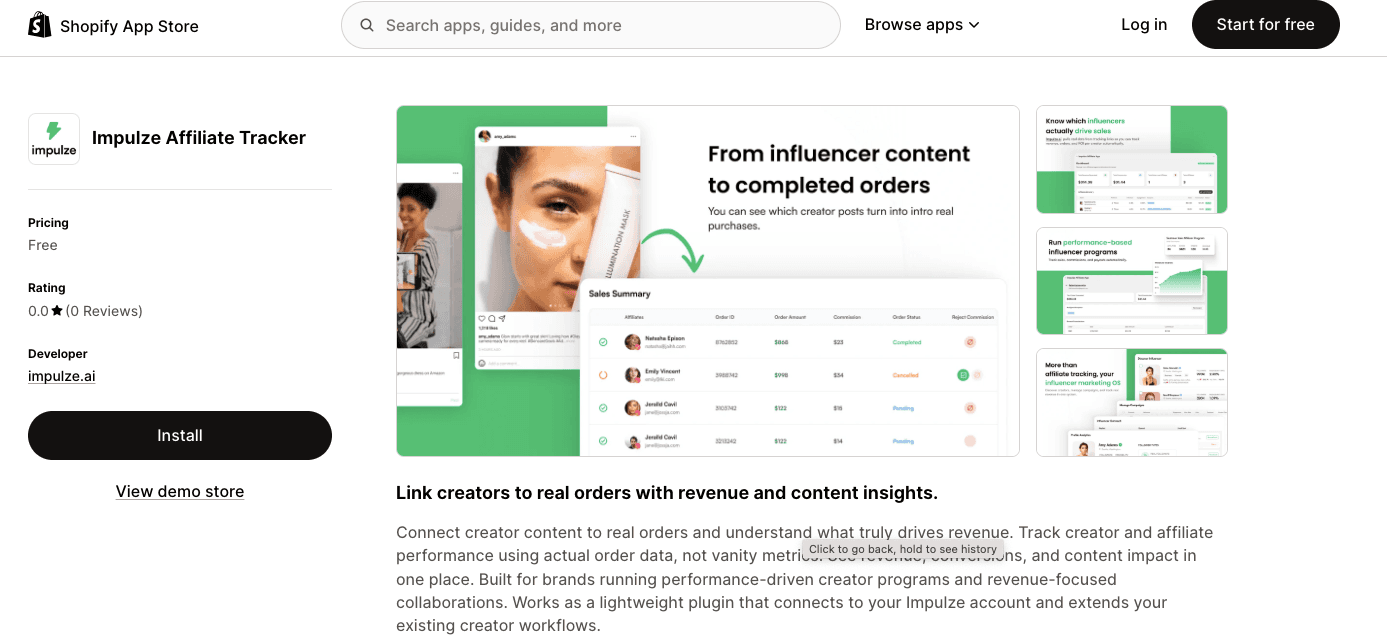
Webhooks auto configure during setup, and you can connect multiple Shopify stores from your settings if you manage more than one brand or region.
• Connect coupons to creators
Pull your existing Shopify discount codes into impulze.ai and assign each code to the right creator.
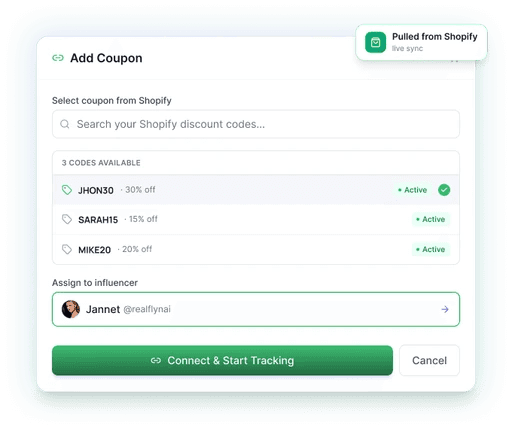
This helps you track which influencer, ambassador, or affiliate creator is driving each sale without manually matching codes later.
• Let revenue attribute itself
Every order is routed back to the creator who drove it.
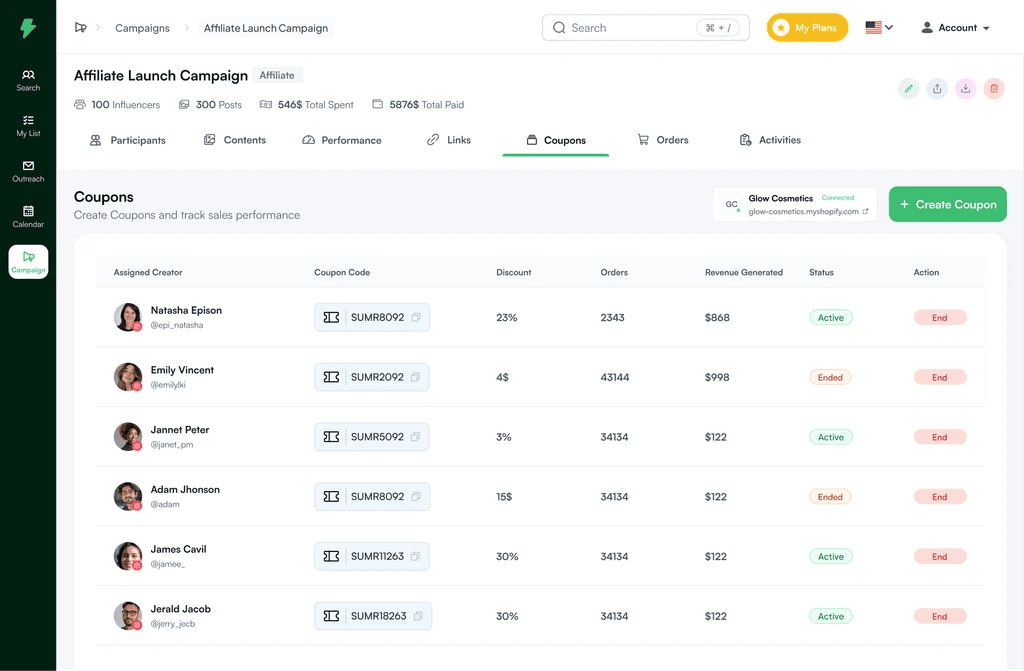
impulze.ai tracks paid, partially refunded, refunded, and cancelled orders, so your reporting reflects actual revenue instead of inflated numbers.
Once connected, your team can move from guessing to knowing. You can see which creators are bringing buyers to your Shopify store, which partnerships deserve renewal, and which ones are not converting. This gives you a clearer way to scale influencer, affiliate, and ambassador campaigns based on revenue, not just likes or clicks.
So if Shopify Collabs helps you start with affiliate tracking, impulze.ai helps you take the next step: building a full creator workflow where discovery, outreach, campaign management, and Shopify sales tracking work together.
Many Shopify brands start with Shopify Collabs because it feels like the obvious first step.
It already sits close to your store. You can invite creators, set up affiliate links, offer gifts or discount codes, track sales, and manage payouts without building a completely separate creator system. For a brand that is just starting with affiliate creators, that is useful. Shopify describes Collabs as an affiliate marketing app that helps merchants recruit and manage creators who can drive sales and reach new audiences.
The question usually comes later.
At first, you might have five creators. Then fifteen. Then fifty. Suddenly, the work is no longer just about creating links and checking who drove sales. You need to find better creators, vet their audiences, manage conversations, track deliverables, monitor content, and decide who is worth renewing.
That is where the difference becomes clear.
Shopify Collabs is built mainly around affiliate creator management inside Shopify. A dedicated influencer platform is built around the full creator workflow, from discovery and vetting to outreach, campaign tracking, reporting, and revenue measurement.
Neither option is automatically better. The right choice depends on where your brand is in its creator marketing journey.
What Is Shopify Collabs?
Shopify Collabs is Shopify’s creator and affiliate collaboration app for merchants.
It helps brands connect with creators through direct invites, open access commission offers, and application pages where creators can apply to work with the brand. Merchants can also use it to send gifts or discount codes, track affiliate sales, and send payments to creators.
In simple terms, it helps Shopify brands run creator affiliate programs closer to where the sales happen.
That matters because a lot of influencer marketing becomes messy when sales data lives in one place and creator management lives somewhere else. Shopify Collabs reduces that gap for brands that are mainly focused on affiliate links, discount codes, and commission payouts.
It is also free to install and you can get it from Shopify App Store, although Shopify notes that additional charges may apply.
For a small Shopify brand that wants to test affiliate creators without adding a complex tool stack, that is a practical starting point.
What Shopify Collabs Does Well
Shopify Collabs is strongest when your creator program is simple and sales-focused. If you want to invite creators, give them a link or code, track their sales, and pay commission, the tool is designed for that workflow. It keeps the affiliate side of creator marketing close to your Shopify admin, which makes the setup easier for e-commerce teams already running everything through Shopify.
It is especially useful for early-stage programs where you are still proving whether creators can drive sales for your store. You do not need a heavy process, a large creator CRM, or advanced reporting on day one. You need a way to give creators offers and see whether those offers turn into orders.
Shopify’s app listing also highlights custom application pages, personalized offers, gifts, open access programs, automatic payouts, attribution, and order tracking as key parts of the product.
That makes it a good fit when your main question is:
“Can we start a creator affiliate program without creating a messy manual process?”
For many Shopify merchants, the answer is yes.
Where Shopify Collabs Starts to Feel Limited
Shopify Collabs works well when your creator program is still simple. If you are inviting a few creators, giving them links or discount codes, and tracking affiliate sales inside Shopify, it can handle that workflow. The problem usually starts when creator marketing becomes more active, more selective, or more strategic.
At that stage, your team is no longer only asking, “Who drove affiliate sales?” You are also asking, “Which creators should we work with in the first place, how do we reach them, how do we manage the relationship, and how do we track everything they do?” That is a much bigger operational problem than basic affiliate tracking.
Here are the common issues brands run into:
• Limited discovery depth
Shopify Collabs can help with creator recruitment, applications, and direct invites. But growing brands often need deeper search across Instagram, TikTok, and YouTube. They may want to filter creators by niche, audience location, engagement quality, posting behavior, and past brand collaborations before deciding who is worth reaching out to.
• Not enough audience vetting before outreach
Affiliate tracking tells you what happened after a creator joined your program. It does not always help you decide whether the creator was a good fit before you contacted them. Before sending product or offering commission, brands often need to check whether the creator’s audience is in their shipping market, whether followers are real and active, whether growth looks natural, and whether sponsored content still performs well.
• Not built for every campaign type
Not every creator partnership is an affiliate program. Shopify brands also run gifting, product seeding, UGC campaigns, ambassador programs, launch campaigns, paid collaborations, whitelisting, and content reuse. These workflows usually need more than affiliate links, discount codes, and commission tracking.
• Outreach can become hard to manage
Once you are contacting dozens of creators, the work starts spreading across Gmail, DMs, spreadsheets, and internal notes. You need a clear way to track replies, follow-ups, negotiations, product shipments, contracts, and creator status. Without that, it becomes easy to forget who replied, who needs a follow-up, and who has already been approved.
• Content tracking becomes important
Knowing who drove sales is useful, but it is only one part of campaign management. You also need to know who posted, when they posted, what content went live, which deliverables are late, and which creators produced content worth reusing. If your team is checking all of that manually, the workflow can get messy quickly.
This does not mean Shopify Collabs is a bad tool. It simply means your creator program may have grown beyond a basic affiliate-first workflow. When your biggest challenge shifts from tracking sales to finding, vetting, managing, and scaling creators, a dedicated influencer platform starts to make more sense.
What Is an Influencer Marketing Platform?
A dedicated influencer platform is built to manage the full creator workflow. Instead of focusing mainly on affiliate links and sales attribution, it helps brands find creators, analyze them, contact them, organize relationships, track campaign activity, and report performance across different channels.
A good influencer platform usually helps with:
• creator discovery
• influencer analytics
• audience demographics
• fake follower checks
• engagement quality analysis
• creator shortlists
• outreach and follow-ups
• creator relationship management
• campaign tracking
• content monitoring
• reporting
• revenue tracking
The main difference is where the workflow begins.
Shopify Collabs works well once you are running affiliate offers and tracking sales. A dedicated influencer platform helps much earlier in the process. It helps you decide who should even be invited into the program.
That matters because the quality of your creator program depends heavily on creator selection. If you recruit the wrong people, the best tracking setup in the world will only show you that they did not perform.
Shopify Collabs vs Influencer Marketing Platforms: The Real Difference
The real difference between Shopify Collabs and a dedicated influencer platform is not that one is “basic” and the other is “advanced.” They simply solve different parts of the creator marketing workflow.
Shopify Collabs is built around affiliate operations inside Shopify. It helps you invite creators, set up affiliate links, offer discount codes or gifts, track sales, and manage payouts. If your main goal is to run a simple creator affiliate program and connect commissions to Shopify orders, it gives you a clean place to start.
A dedicated influencer platform is built around the full creator workflow. It helps you find creators, vet their audience, manage outreach, track content, organize relationships, and measure performance across campaigns and platforms. This becomes important when your creator strategy grows beyond links and commissions.
Here is a clearer way to compare both.
1. Creator Discovery
Shopify Collabs:
Helps you recruit creators through applications, direct invites, and the Collabs creator network. This works well when creators are already interested in your brand or when you are running a simple affiliate program.
Dedicated influencer platform:
Helps you actively search for creators across platforms like Instagram, TikTok, and YouTube. You can usually filter by niche, location, audience demographics, engagement rate, content type, and past collaborations.
What this means:
Shopify Collabs is useful when creators come to you. A dedicated influencer platform is useful when you need to go out and find the right creators yourself.
2. Creator Vetting
Shopify Collabs:
Useful once creators are already in your affiliate workflow, but it is not mainly built for deep pre-outreach vetting.
Dedicated influencer platform:
Lets you check audience quality, fake follower signals, engagement patterns, follower growth, audience location, and content fit before reaching out.
What this means:
If you need to know whether a creator is actually worth contacting, a dedicated influencer platform gives you more decision making data before the partnership starts.
3. Outreach and Relationship Management
Shopify Collabs:
Supports creator invites and affiliate program communication, especially around offers and participation.
Dedicated influencer platform:
Helps manage outreach, follow ups, replies, negotiations, creator notes, campaign status, and relationship history in one place.
What this means:
Shopify Collabs can work for simple recruitment. A dedicated platform becomes more useful when outreach starts spreading across Gmail, DMs, spreadsheets, and internal notes.
4. Campaign Types
Shopify Collabs:
Best suited for affiliate programs, gifts, discount codes, commission tracking, and creator sales attribution inside Shopify.
Dedicated influencer platform:
Supports broader campaign types like gifting, UGC campaigns, paid collaborations, ambassador programs, launch campaigns, whitelisting, product seeding, and content reuse.
What this means:
If your creator program is mostly affiliate-based, Shopify Collabs may be enough. If you run multiple types of influencer campaigns, you will likely need a broader workflow.
5. Content Tracking
Shopify Collabs:
Helps connect creator activity to affiliate sales, but content tracking is not the main focus.
Dedicated influencer platform:
Helps track what content went live, when it was posted, which deliverables are late, which creators followed the brief, and which posts are worth repurposing.
What this means:
Sales tracking tells you what converted. Content tracking tells you what actually happened in the campaign.
6. Performance Reporting
Shopify Collabs:
Useful for seeing affiliate sales, orders, commissions, and creator revenue tied to Shopify.
Dedicated influencer platform:
Gives a wider view of creator performance, including engagement, reach, content delivery, audience quality, campaign results, and sales if Shopify tracking is connected.
What this means:
Shopify Collabs answers, “Who drove sales?” A dedicated influencer platform helps answer, “Which creators are worth working with again, and why?”
7. Best Fit
Shopify Collabs:
Best for Shopify brands starting with affiliate creators, simple commission programs, and sales tracking inside Shopify.
Dedicated influencer platform:
Best for brands that need active creator discovery, deeper vetting, outreach workflows, campaign management, and multi-platform creator tracking.
What this means:
Shopify Collabs is a strong starting point. A dedicated influencer platform becomes useful when creator marketing becomes a repeatable growth channel instead of a simple affiliate setup.
Shopify Collabs vs Influencer Platforms: Which One Fits Your Creator Program?
Feature | Shopify Collabs | Dedicated Influencer Platform |
|---|---|---|
Best for | Simple Shopify affiliate programs | Full creator campaign management |
Creator discovery | Applications, invites, Collabs network | Search across Instagram, TikTok, YouTube |
Audience vetting | Limited pre outreach analysis | Audience quality, fake followers, demographics, growth |
Outreach | Creator invites and program communication | Outreach, follow ups, replies, pipeline tracking |
Campaign types | Affiliate links, codes, gifts, commissions | Gifting, UGC, paid campaigns, ambassadors, launches |
Content tracking | Not the main focus | Tracks posts, deliverables, deadlines, live content |
Reporting | Sales, orders, commissions | Engagement, content, creator performance, sales |
Best stage | Starting out | Scaling creator programs |
When You Should Switch to an Influencer Marketing Platform
The switch usually becomes obvious when the work starts spreading across too many places.
You search for creators manually. You vet them in one tool. You track outreach in a spreadsheet. You check posts on Instagram, TikTok, and YouTube by hand. Shopify tells you who drove sales, but it does not show the full story of how that creator entered your workflow, what content they posted, or whether they should be renewed.
At that point, the program is no longer small enough to manage casually.
You should consider a dedicated influencer platform when:
• You need to actively find creators instead of waiting for applications
• You want deeper audience data before reaching out
• Your team manages creators across Instagram, TikTok, and YouTube
• Outreach is scattered across Gmail, DMs, and spreadsheets
• You run gifting, UGC, ambassador, paid, or launch campaigns
• You need to track posts and deliverables, not just sales
• You cannot quickly tell which creators are worth renewing
• Reporting takes too long because data lives in too many places
This is the stage where a dedicated platform starts saving real time. It also helps you make better decisions. You are not just tracking revenue after the fact. You are improving the quality of the creators entering the program in the first place.
If your biggest question has shifted from “how do we track sales?” to “how do we find, vet, manage, and scale the right creators?” then you have likely outgrown a basic affiliate-first workflow.
The Middle Ground: Keep Shopify Revenue Tracking, Upgrade the Creator Workflow
The best answer is not always replacing one tool with another. For many Shopify brands, the ideal setup is combining creator workflow management with revenue tracking. You want to find creators properly, manage the relationship, monitor content, and still connect results back to Shopify sales.
That is the middle ground.
A strong creator workflow should help your team:
• Discover relevant creators
• Vet audience quality before outreach
• Manage conversations and follow ups
• Organize creators by campaign or product line
• Track content and deliverables
• Monitor engagement and performance
• Connect creator activity to Shopify revenue
• Renew creators based on actual results
This is where impulze.ai fits naturally.
With Impulze.ai, Shopify brands can search for creators, analyze audience quality, manage outreach, track campaign activity, and connect creator performance to Shopify sales in one workflow. Instead of judging creators only by likes, comments, or affiliate clicks, you can see which partnerships are actually driving orders and revenue.
That makes your creator program easier to scale because your team is not stuck piecing together discovery, outreach, tracking, and sales data from separate places.
How to Integrate Shopify With impulze.ai?
Once your creator program starts growing, tracking performance manually becomes messy. You may know which creators posted, but not always which ones actually drove sales. That is where the Shopify integration in impulze.ai becomes useful.
With the Shopify integration, you can connect your store to impulze.ai and track creator-driven sales directly from your influencer campaigns. Instead of switching between your creator list, outreach tracker, Shopify dashboard, and spreadsheets, you can manage the full workflow in one place.
Here’s how it works:
• Connect your Shopify store
Install impulze.ai from the Shopify App Store in one click.
Webhooks auto configure during setup, and you can connect multiple Shopify stores from your settings if you manage more than one brand or region.
• Connect coupons to creators
Pull your existing Shopify discount codes into impulze.ai and assign each code to the right creator.
This helps you track which influencer, ambassador, or affiliate creator is driving each sale without manually matching codes later.
• Let revenue attribute itself
Every order is routed back to the creator who drove it.
impulze.ai tracks paid, partially refunded, refunded, and cancelled orders, so your reporting reflects actual revenue instead of inflated numbers.
Once connected, your team can move from guessing to knowing. You can see which creators are bringing buyers to your Shopify store, which partnerships deserve renewal, and which ones are not converting. This gives you a clearer way to scale influencer, affiliate, and ambassador campaigns based on revenue, not just likes or clicks.
So if Shopify Collabs helps you start with affiliate tracking, impulze.ai helps you take the next step: building a full creator workflow where discovery, outreach, campaign management, and Shopify sales tracking work together.
Frequently Asked Questions
What is Shopify Collabs?

What is Shopify Collabs?
Is Shopify Collabs free?
Is Shopify Collabs free?
What is the difference between Shopify Collabs and an influencer platform?
What is the difference between Shopify Collabs and an influencer platform?
When should I switch from Shopify Collabs to an influencer platform?
When should I switch from Shopify Collabs to an influencer platform?
Can Shopify Collabs track influencer sales?
Can Shopify Collabs track influencer sales?
Is Shopify Collabs enough for influencer marketing?
Is Shopify Collabs enough for influencer marketing?
What is the best Shopify Collabs alternative?
What is the best Shopify Collabs alternative?
Author Bio
Author Bio
Rashmi Singh
Rashmi Singh
Rashmi Singh is a writer and strategist with more than 7 years of experience. When not writing, she is either spending time with her friends or planning her next trip. You can learn more about her here.
Rashmi Singh is a writer and strategist with more than 7 years of experience. When not writing, she is either spending time with her friends or planning her next trip. You can learn more about her here.
We Also Recommend To Read