🥳 Skip the subscription. Pay $299 once for lifetime access— See lifetime plans
🥳 Skip the subscription. Pay $299 once for lifetime access—

8 MIN READ
Top Tools & Software
Top Tools & Software
Best Free Chrome Extensions for Instagram: Inssist vs SocialiQ and 4 More
Best Free Chrome Extensions for Instagram: Inssist vs SocialiQ and 4 More
Best Free Chrome Extensions for Instagram: Inssist vs SocialiQ and 4 More
Best Free Chrome Extensions for Instagram: Inssist vs SocialiQ and 4 More

Nandini Tripathi
Nandini Tripathi
Nandini Tripathi
Content Marketer @impulze.ai

Sections
Build your first creator list on Solo, $29 a month.

Blog in Short ⏱️
Blog in Short ⏱️
A quick glance at the highlights—perfect for when you're short on time.
A quick glance at the highlights—perfect for when you're short on time.
Short answer: Inssist for posting and DMs, SocialiQ for finding and vetting influencers, Kolsquare or Grin for audience and analytics checks, RiteTag for hashtags. Most have a free tier.
Short answer: the best free Chrome extensions for Instagram depend on the job. Use SocialiQ to find and vet influencers, Inssist to post, schedule and reply to DMs from your desktop, Kolsquare or Grin to check creator analytics, and RiteTag for hashtags. Most have a free tier, and you can run several side by side.
impulze.ai is an influencer marketing platform for agencies and brands to find, vet and track creators across Instagram, TikTok and YouTube. We build one of the extensions on this list (SocialiQ), so we have said plainly where another tool does a job better.
What is a Chrome extension for Instagram?
A Chrome extension for Instagram is a small add-on for the Chrome browser that adds features Instagram’s own website lacks. Some turn the desktop site into a full posting tool. Others lay creator metrics over a profile while you browse, suggest hashtags, or save profiles into lists. They install from the Chrome Web Store in a few seconds and run only in your browser.
For marketers, the appeal is simple: Instagram is built for phones, but planning, vetting creators and reporting happen at a desk. An extension closes that gap without adding another full platform to your stack.
Which Chrome extension for Instagram should you use? (comparison)
Here is how the six extensions in this guide compare. Pricing changes often, so treat the free-tier notes as a starting point and check each listing before you commit.
Extension | Best for | Main job | Platforms | Free option |
SocialiQ (impulze.ai) | Agencies and brands vetting creators | Find, qualify and shortlist influencers while you browse | Instagram, TikTok, YouTube | Freemium: 50 profile views a month |
Inssist | Creators and social media managers | Post, schedule, DMs and downloads from desktop | Free plan; scheduling is paid | |
Grin | Brands already on Grin | Creator analytics and post auditing | Instagram, TikTok, YouTube, Pinterest | Check the listing |
Kolsquare Analytics Sidebar | Audience checks | Audience breakdown and authenticity signals | Instagram, TikTok | Check the listing |
RiteTag | Hashtag research | Hashtag suggestions and strength ratings | Instagram, X, Facebook, LinkedIn, Pinterest | Check the listing |
GrowBot | Account growth (use with care) | Automated follows and likes | Check the listing |
Why use a Chrome extension for Instagram marketing?
Work from your desktop. A bigger screen, a real keyboard and several tabs make planning and outreach faster than on a phone.
Get data Instagram doesn’t show. Native Insights only cover your own account. Extensions can show engagement, posting frequency and audience signals for other accounts, which is what you need when picking creators.
Skip the copy-paste. Saving a profile into a list in one click beats a spreadsheet full of handles and screenshots.
Connect to your other tools. Some extensions sync to a dashboard, CRM or campaign tracker, so the research you do while browsing isn’t lost.
1. SocialiQ by impulze.ai: best for finding and vetting influencers

SocialiQ is impulze.ai’s free Chrome extension, which we call an Influencer Marketing Assistant. It sits on top of Instagram, TikTok and YouTube and shows a creator’s key numbers while you look at their profile, so you can decide in seconds whether they are worth a closer look.
What you can do with it:
See engagement rate, posting frequency, content performance and hashtags on any public profile.
Get suggestions for similar creators, which helps when one good fit needs ten more like it.
Save creators into lists on the spot and pick them up later in your impulze.ai workspace.
Unlock contact details so outreach can start right away.
Pricing: SocialiQ is freemium. The free version lets you view 50 profiles a month, plus 3 creator recommendations and 5 contact unlocks once you create a profile. The extension does not show audience demographics; for gender and location data you need the impulze.ai platform.

Best for: agencies building shortlists for several clients, and brand teams who want to vet creators without opening a separate tool. If you would rather search a database than check profiles one by one, the free influencer search tool does the same job from any browser.
2. Inssist: best for posting and DMs from your desktop

Inssist turns Chrome into a desktop Instagram client. It loads Instagram in a phone-style view, so you can do things the normal website makes awkward: post reels and stories, manage DMs and download content. Inssist says it is used by more than 500,000 creators.
What the free plan covers, according to Inssist’s own pricing page:
Publish photos, videos, reels and stories from your computer.
Save and repost posts with attribution, and download posts.
DM templates for faster replies.
Hashtag assist.
Scheduling (post later, a posting calendar and time slots), bulk profile downloads, hashtag metrics and extras like music on stories sit in the paid plans. Inssist also offers growth automation and a connection for AI agents.
Best for: creators and social media managers who publish a lot and want to stay off their phone.
Inssist vs SocialiQ: which one do you need?
People often compare these two because both are popular Chrome extensions for Instagram, but they solve different problems. Inssist helps you run your own account. SocialiQ helps you judge other people’s accounts, mainly creators you might hire.
Inssist | SocialiQ | |
Main job | Post, schedule, DM and download on desktop | Find, vet and shortlist influencers |
Whose account | Yours | Creators you are researching |
Platforms | Instagram, TikTok, YouTube | |
Creator metrics on other profiles | Not its focus | Engagement rate, posting frequency, content performance |
Lists and outreach | DM templates | Creator lists and contact unlocks |
Free tier | Free plan, scheduling is paid | 50 profile views a month |
Typical user | Creator, social media manager | Agency, brand marketer |
Our take: if you manage a brand account and also hire creators, use both. Inssist handles your publishing; SocialiQ handles creator research. They don’t overlap enough to replace each other.
3. Grin: best if your brand already uses Grin

Grin’s extension brings creator analytics into the browser for Instagram, TikTok, YouTube and Pinterest. It shows engagement rate, likes, comments, video views and the likes-to-comments ratio, and it can audit a creator’s posts to check whether their numbers hold up.
Best for: brands already paying for Grin. The extension is built around the Grin platform, so it adds most value when your creator lists and campaigns already live there.
4. Kolsquare Analytics Sidebar: best for audience checks

Kolsquare’s sidebar adds audience analysis to Instagram and TikTok profiles. It shows audience age, gender, top cities and countries, and languages, plus an authenticity score to flag suspicious activity and estimates of reach and impressions. You can save creators into lists in the Kolsquare dashboard.
Best for: teams that need to check who a creator’s audience actually is before signing a deal. If you want to go deeper on spotting bought followers, our guide on how to find fake followers walks through the manual checks.
5. RiteTag: best for hashtag research
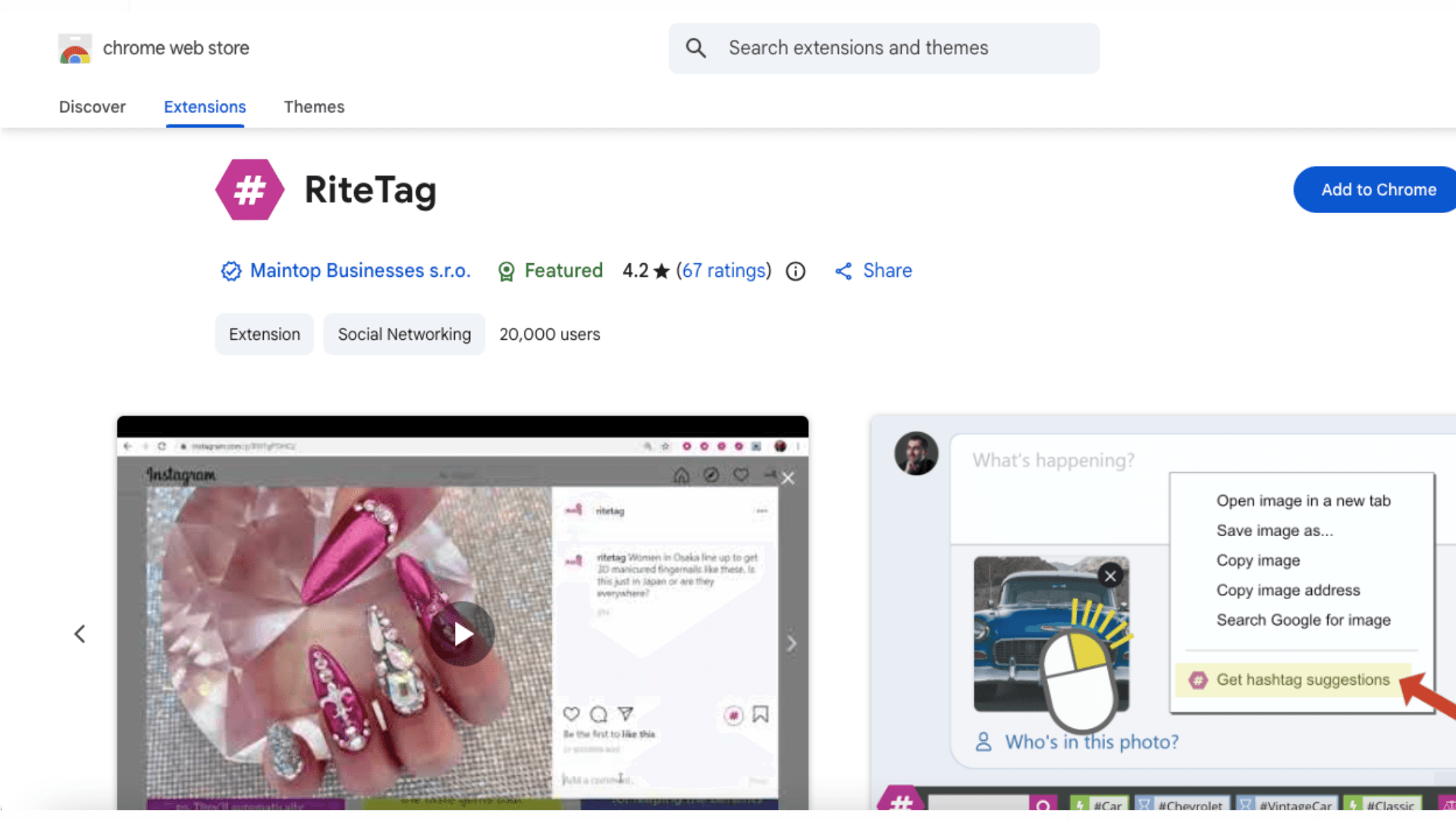
RiteTag suggests hashtags for images and text as you work. Right-click an image or a piece of text to get suggestions, and its colour codes show at a glance whether a tag will help a post be seen now, keep it visible over time, or is too crowded to bother with. It works across Instagram, X, Facebook, LinkedIn and Pinterest.
Best for: creators and social media managers writing captions daily.
6. GrowBot: automation, with a warning

GrowBot automates follows and likes for accounts that match your filters (follower count, bio text and more), loads lists of engaged users, and can remove spammy followers from your own account.
A word of caution: Instagram restricts automated activity, and bulk follow-and-like tools can get an account rate-limited or flagged. If you try GrowBot, keep volumes low and never run it on a client’s account without their sign-off.
How do you pick the right Instagram extension? (4 steps)
Name the job. Publishing, creator research, audience checks and hashtags are different tasks. Pick one extension per job rather than one that does everything badly.
Check what the free tier really includes. Many tools put the feature you need (scheduling, contact details, audience data) behind a paid plan. Read the pricing page before you build a workflow around it.
Read the permissions. Chrome shows what an extension can access when you install it. Avoid tools that ask for more than their job needs, and be careful with anything that wants your Instagram password.
Test on real work for a week. Vet five creators or schedule a week of posts. If it hasn’t saved you time by then, remove it.
How agencies and brands use these extensions together
Agencies usually juggle several clients at once. A common setup is SocialiQ for research while browsing, one list per client, then the full impulze.ai workspace for influencer search, reporting and campaign tracking. Inssist or a scheduler covers the publishing side for clients who also hand over their social accounts.
Brands tend to start smaller: one extension to vet creators, a quick look at engagement rates against niche benchmarks, and a free Instagram engagement rate calculator to double-check a creator before reaching out.
Summing it up
Chrome extensions are the cheapest way to make Instagram work better on a desktop. Pick by job: Inssist for posting and DMs, SocialiQ for finding and vetting creators, Kolsquare or Grin for audience and analytics checks, and RiteTag for hashtags. Start with the free tiers, keep the ones that save you time, and remove the rest.
If creator research is the part eating your week, try SocialiQ for free.
Short answer: the best free Chrome extensions for Instagram depend on the job. Use SocialiQ to find and vet influencers, Inssist to post, schedule and reply to DMs from your desktop, Kolsquare or Grin to check creator analytics, and RiteTag for hashtags. Most have a free tier, and you can run several side by side.
impulze.ai is an influencer marketing platform for agencies and brands to find, vet and track creators across Instagram, TikTok and YouTube. We build one of the extensions on this list (SocialiQ), so we have said plainly where another tool does a job better.
What is a Chrome extension for Instagram?
A Chrome extension for Instagram is a small add-on for the Chrome browser that adds features Instagram’s own website lacks. Some turn the desktop site into a full posting tool. Others lay creator metrics over a profile while you browse, suggest hashtags, or save profiles into lists. They install from the Chrome Web Store in a few seconds and run only in your browser.
For marketers, the appeal is simple: Instagram is built for phones, but planning, vetting creators and reporting happen at a desk. An extension closes that gap without adding another full platform to your stack.
Which Chrome extension for Instagram should you use? (comparison)
Here is how the six extensions in this guide compare. Pricing changes often, so treat the free-tier notes as a starting point and check each listing before you commit.
Extension | Best for | Main job | Platforms | Free option |
SocialiQ (impulze.ai) | Agencies and brands vetting creators | Find, qualify and shortlist influencers while you browse | Instagram, TikTok, YouTube | Freemium: 50 profile views a month |
Inssist | Creators and social media managers | Post, schedule, DMs and downloads from desktop | Free plan; scheduling is paid | |
Grin | Brands already on Grin | Creator analytics and post auditing | Instagram, TikTok, YouTube, Pinterest | Check the listing |
Kolsquare Analytics Sidebar | Audience checks | Audience breakdown and authenticity signals | Instagram, TikTok | Check the listing |
RiteTag | Hashtag research | Hashtag suggestions and strength ratings | Instagram, X, Facebook, LinkedIn, Pinterest | Check the listing |
GrowBot | Account growth (use with care) | Automated follows and likes | Check the listing |
Why use a Chrome extension for Instagram marketing?
Work from your desktop. A bigger screen, a real keyboard and several tabs make planning and outreach faster than on a phone.
Get data Instagram doesn’t show. Native Insights only cover your own account. Extensions can show engagement, posting frequency and audience signals for other accounts, which is what you need when picking creators.
Skip the copy-paste. Saving a profile into a list in one click beats a spreadsheet full of handles and screenshots.
Connect to your other tools. Some extensions sync to a dashboard, CRM or campaign tracker, so the research you do while browsing isn’t lost.
1. SocialiQ by impulze.ai: best for finding and vetting influencers
SocialiQ is impulze.ai’s free Chrome extension, which we call an Influencer Marketing Assistant. It sits on top of Instagram, TikTok and YouTube and shows a creator’s key numbers while you look at their profile, so you can decide in seconds whether they are worth a closer look.
What you can do with it:
See engagement rate, posting frequency, content performance and hashtags on any public profile.
Get suggestions for similar creators, which helps when one good fit needs ten more like it.
Save creators into lists on the spot and pick them up later in your impulze.ai workspace.
Unlock contact details so outreach can start right away.
Pricing: SocialiQ is freemium. The free version lets you view 50 profiles a month, plus 3 creator recommendations and 5 contact unlocks once you create a profile. The extension does not show audience demographics; for gender and location data you need the impulze.ai platform.
Best for: agencies building shortlists for several clients, and brand teams who want to vet creators without opening a separate tool. If you would rather search a database than check profiles one by one, the free influencer search tool does the same job from any browser.
2. Inssist: best for posting and DMs from your desktop
Inssist turns Chrome into a desktop Instagram client. It loads Instagram in a phone-style view, so you can do things the normal website makes awkward: post reels and stories, manage DMs and download content. Inssist says it is used by more than 500,000 creators.
What the free plan covers, according to Inssist’s own pricing page:
Publish photos, videos, reels and stories from your computer.
Save and repost posts with attribution, and download posts.
DM templates for faster replies.
Hashtag assist.
Scheduling (post later, a posting calendar and time slots), bulk profile downloads, hashtag metrics and extras like music on stories sit in the paid plans. Inssist also offers growth automation and a connection for AI agents.
Best for: creators and social media managers who publish a lot and want to stay off their phone.
Inssist vs SocialiQ: which one do you need?
People often compare these two because both are popular Chrome extensions for Instagram, but they solve different problems. Inssist helps you run your own account. SocialiQ helps you judge other people’s accounts, mainly creators you might hire.
Inssist | SocialiQ | |
Main job | Post, schedule, DM and download on desktop | Find, vet and shortlist influencers |
Whose account | Yours | Creators you are researching |
Platforms | Instagram, TikTok, YouTube | |
Creator metrics on other profiles | Not its focus | Engagement rate, posting frequency, content performance |
Lists and outreach | DM templates | Creator lists and contact unlocks |
Free tier | Free plan, scheduling is paid | 50 profile views a month |
Typical user | Creator, social media manager | Agency, brand marketer |
Our take: if you manage a brand account and also hire creators, use both. Inssist handles your publishing; SocialiQ handles creator research. They don’t overlap enough to replace each other.
3. Grin: best if your brand already uses Grin
Grin’s extension brings creator analytics into the browser for Instagram, TikTok, YouTube and Pinterest. It shows engagement rate, likes, comments, video views and the likes-to-comments ratio, and it can audit a creator’s posts to check whether their numbers hold up.
Best for: brands already paying for Grin. The extension is built around the Grin platform, so it adds most value when your creator lists and campaigns already live there.
4. Kolsquare Analytics Sidebar: best for audience checks
Kolsquare’s sidebar adds audience analysis to Instagram and TikTok profiles. It shows audience age, gender, top cities and countries, and languages, plus an authenticity score to flag suspicious activity and estimates of reach and impressions. You can save creators into lists in the Kolsquare dashboard.
Best for: teams that need to check who a creator’s audience actually is before signing a deal. If you want to go deeper on spotting bought followers, our guide on how to find fake followers walks through the manual checks.
5. RiteTag: best for hashtag research
RiteTag suggests hashtags for images and text as you work. Right-click an image or a piece of text to get suggestions, and its colour codes show at a glance whether a tag will help a post be seen now, keep it visible over time, or is too crowded to bother with. It works across Instagram, X, Facebook, LinkedIn and Pinterest.
Best for: creators and social media managers writing captions daily.
6. GrowBot: automation, with a warning
GrowBot automates follows and likes for accounts that match your filters (follower count, bio text and more), loads lists of engaged users, and can remove spammy followers from your own account.
A word of caution: Instagram restricts automated activity, and bulk follow-and-like tools can get an account rate-limited or flagged. If you try GrowBot, keep volumes low and never run it on a client’s account without their sign-off.
How do you pick the right Instagram extension? (4 steps)
Name the job. Publishing, creator research, audience checks and hashtags are different tasks. Pick one extension per job rather than one that does everything badly.
Check what the free tier really includes. Many tools put the feature you need (scheduling, contact details, audience data) behind a paid plan. Read the pricing page before you build a workflow around it.
Read the permissions. Chrome shows what an extension can access when you install it. Avoid tools that ask for more than their job needs, and be careful with anything that wants your Instagram password.
Test on real work for a week. Vet five creators or schedule a week of posts. If it hasn’t saved you time by then, remove it.
How agencies and brands use these extensions together
Agencies usually juggle several clients at once. A common setup is SocialiQ for research while browsing, one list per client, then the full impulze.ai workspace for influencer search, reporting and campaign tracking. Inssist or a scheduler covers the publishing side for clients who also hand over their social accounts.
Brands tend to start smaller: one extension to vet creators, a quick look at engagement rates against niche benchmarks, and a free Instagram engagement rate calculator to double-check a creator before reaching out.
Summing it up
Chrome extensions are the cheapest way to make Instagram work better on a desktop. Pick by job: Inssist for posting and DMs, SocialiQ for finding and vetting creators, Kolsquare or Grin for audience and analytics checks, and RiteTag for hashtags. Start with the free tiers, keep the ones that save you time, and remove the rest.
If creator research is the part eating your week, try SocialiQ for free.
Frequently Asked Questions
What is the best free Chrome extension for Instagram?

What is the best free Chrome extension for Instagram?
What is the best free Chrome extension for Instagram?
Is the Inssist extension free?
Is the Inssist extension free?
Is the Inssist extension free?
What is the difference between Inssist and SocialiQ?
What is the difference between Inssist and SocialiQ?
What is the difference between Inssist and SocialiQ?
Are Chrome extensions for Instagram safe?
Are Chrome extensions for Instagram safe?
Are Chrome extensions for Instagram safe?
Which Chrome extension is best for influencer marketing agencies?
Which Chrome extension is best for influencer marketing agencies?
Which Chrome extension is best for influencer marketing agencies?
Can I schedule Instagram posts with a Chrome extension?
Can I schedule Instagram posts with a Chrome extension?
Can I schedule Instagram posts with a Chrome extension?
Author Bio
Author Bio
Nandini Tripathi
Nandini Tripathi
Hey! I’m Nandini, a content writer who turns brand blah into brand ta-da! I write words that work and turn ideas into content that sounds good, feels right, and actually gets read.
Hey! I’m Nandini, a content writer who turns brand blah into brand ta-da! I write words that work and turn ideas into content that sounds good, feels right, and actually gets read.
We Also Recommend To Read