🥳 Skip the subscription. Pay $299 once for lifetime access— See lifetime plans
🥳 Skip the subscription. Pay $299 once for lifetime access—

11 MIN READ
Strategy
Strategy
How to Build Influencer Database for Scalable Campaigns
How to Build Influencer Database for Scalable Campaigns
How to Build Influencer Database for Scalable Campaigns

Rashmi Singh
Rashmi Singh
Rashmi Singh
Content Marketer @impulze.ai
Sections
Build your first creator list on Solo, $29 a month.

Blog in Short ⏱️
Blog in Short ⏱️
A quick glance at the highlights—perfect for when you're short on time.
A quick glance at the highlights—perfect for when you're short on time.
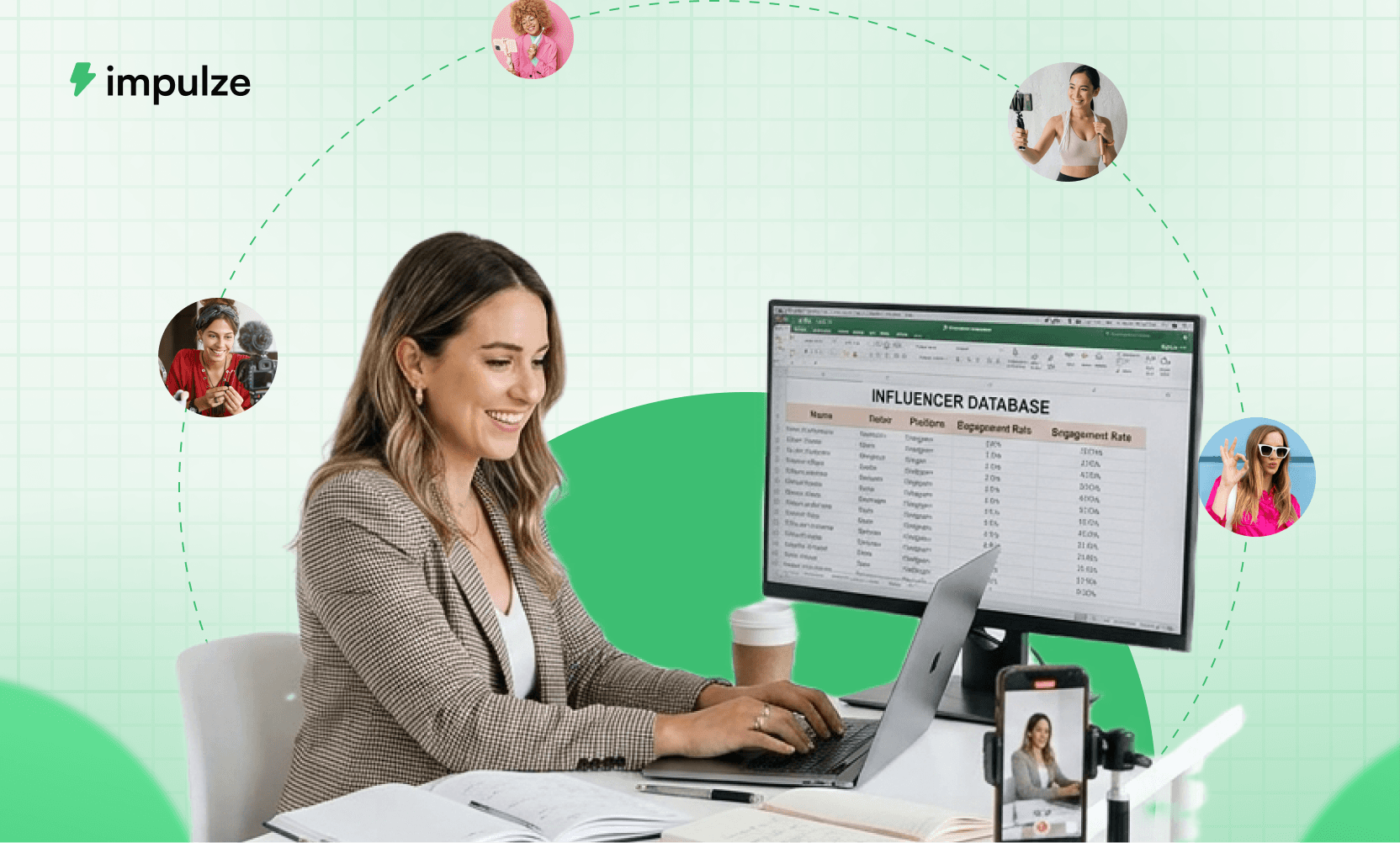
Building an influencer list is easy when you have ten creators. It gets messy when you have hundreds of profiles, multiple campaigns, three teammates, outdated emails, missing rates, duplicate outreach, and no clear view of who is actually performing.
A good influencer database should help you:
Find the right creators faster
Store useful creator details in one place
Track outreach and replies
Organize influencers by campaign
Avoid duplicate work
Compare creator performance
Build stronger relationships over time
Scale campaigns without losing context
This blog shows you how to build an influencer database properly, what fields to include, how to organize influencers for campaign work, when a spreadsheet is enough, and when influencer list management needs a proper platform.
Most influencer lists start the same way.
Someone opens a spreadsheet, adds a creator name, pastes an Instagram handle, adds follower count, maybe adds an email, and calls it a database. This can work for the first few campaigns.
Then the list grows.
One creator appears in three tabs. Someone forgets who already reached out. A teammate adds an old email. A creator who performed well last quarter gets lost in the sheet. Another creator gets contacted twice by two different people. Campaign results live in a separate report. Outreach lives in Gmail. Content links live in Slack. Payment notes live in someone’s memory.
That is when an influencer list stops being useful.
The problem is not the spreadsheet itself. The problem is that most influencer databases are built as static lists, not campaign systems.
If you want to build an influencer database that actually supports growth, it needs to help your team answer simple questions fast:
Who is this creator?
Are they a good fit for this campaign?
Have we contacted them before?
Did they reply?
What did they quote?
What content did they post?
How did they perform?
Should we work with them again?
This guide walks through how to build and manage an influencer database that works beyond the first campaign.
What Is an Influencer Database?
An influencer database is a structured system where brands and agencies store, organize, evaluate, contact, and track creators for influencer marketing campaigns.
A basic influencer database may include:
Field | Example |
|---|---|
Creator name | Sarah Lee |
Platform | |
Handle | @sarahbeauty |
Niche | Skincare |
Country | United States |
Follower count | 85,000 |
Engagement rate | 3.8 percent |
Campaign fit | High |
Outreach status | Replied |
Quoted rate | $800 |
Past performance | Strong saves and link clicks |
But a useful influencer database goes beyond profile details. It should also show relationship history, outreach progress, campaign status, content deadlines, performance metrics, and notes that help your team make better decisions later.
A good way to understand is this:
A basic influencer list stores creator details. A strong influencer database helps you decide who to contact, when to follow up, who to prioritize, and who is worth working with again.
Why Most Influencer Lists Fall Apart
Influencer list management usually breaks when the team starts scaling. Here are the most common reasons.
1. The list has too many creators but not enough context
A creator name and handle are not enough. At scale, your team needs to know why that creator was added.
Was it because of the audience fit? Content quality? Past performance? Competitor collaboration? Location? Engagement? Niche relevance?
Without context, every shortlist becomes another round of manual checking.
2. The same creator gets added multiple times
This happens all the time. One teammate adds the Instagram profile. Another adds the TikTok profile. Someone else adds the YouTube channel. Then the same creator appears under slightly different names.
That creates confusion during outreach and reporting. Duplicate creators can create problems like:
Two teammates contacting the same creator: This makes the brand look unorganized and can hurt the relationship before it even starts.
Different rates being recorded for the same creator: One teammate may see an old quote while another negotiates a new one, which makes pricing messy.
Campaign history getting split across different rows: Past performance becomes harder to trust because the full creator history is not in one place.
A creator being rejected once and approved later without context: Your team may repeat the same review process because there is no clear decision record.
A scalable influencer database needs duplicate checks and unified creator profiles, so every creator has one clean record your team can trust.
3. Outreach status is unclear
This is where influencer outreach tracker fields become important. If you do not track outreach properly, your team will not know:
Who was contacted
When they were contacted
Which email was used
Who owns the conversation
Whether a follow up is due
What the creator replied
Whether the creator said yes, no, later, or quoted too high
Without outreach tracking, the list becomes a graveyard of names.
4. Campaign details are stored separately
Many teams keep creator lists in one sheet, outreach in Gmail, deliverables in another tracker, and results in a reporting deck. This creates a broken workflow.
The creator database should connect to campaign work. For example, if you ran a skincare campaign with 50 creators, you should be able to quickly see who was shortlisted, who got approved, who posted on time, who missed deadlines, who drove saves, clicks, sales, or engagement, and who is worth inviting again.
If this information is scattered, campaign learning gets lost.
5. The list is not updated
Creator data changes quickly. Follower count changes. Engagement changes. Email addresses change. Content direction changes. Audience location changes. Rates change. Brand safety concerns can appear later.
A database that is not updated becomes risky. Before every campaign, you should refresh key creator data instead of relying on what someone added six months ago.
6. Performance history is missing
This is one of the biggest gaps.
Many brands build influencer lists for outreach, but they do not connect the list to performance. That means they keep asking the same questions again:
Did this creator perform well last time?
Were their comments authentic?
Did their audience click?
Did their content get saved?
Did the content need too many edits?
Were they easy to work with?
Did they post on time?
The best influencer database becomes smarter after every campaign.
Why Influencer List Management Matters More as Campaigns Scale
Influencer marketing is no longer just about finding a few popular creators.
Brands are building larger creator programs, testing micro-influencers, using performance links, running affiliate campaigns, and tracking content across platforms.
According to Sprout Social, 59 percent of marketers planned to partner with more influencers in 2025, while 76 percent of C suite executives reported growing influencer budgets. The same summary reported that 83 percent of marketers say sponsored influencer content generates more conversions than brand organic posts.
That growth creates an operational problem.
More creators means more profiles to review, more emails to send, more briefs to manage, more deliverables to track, and more performance data to compare.
The Influencer Marketing Hub 2026 Benchmark Report also frames influencer marketing as a channel where budgets are rising, expectations are tightening, and measurement is becoming sharper. It notes that scaling is no longer about finding a few good creators, but building an operating system that can handle cost, credibility, and performance scrutiny.
That is why influencer list management matters.
Your creator list holds the details, decisions, conversations, and campaign history that keep your influencer marketing workflow moving smoothly.
How to Build an Influencer Database From Scratch
Here is a practical step-by-step way to build an influencer database that can support real campaigns.
Step 1: Define the Purpose of Your Influencer Database
Before adding creators, decide what your database is supposed to help you do. Most teams skip this and start collecting profiles too early.
Ask these questions first:
Are you building the database for one campaign or for future campaigns too?
A long term database needs more fields because you will want to reuse creator details later.Are you tracking only discovery, or do you want to manage the full campaign workflow?
If outreach, deliverables, and reporting are involved, your database needs separate fields for each stage.Will multiple teammates use the same database?
If yes, add ownership and status fields so everyone knows who is handling what.Are you working with creators across Instagram, TikTok, and YouTube?
If yes, create unified creator profiles instead of treating each platform as a separate record.Do you care about ROI tracking?
If yes, include performance fields like clicks, sales, revenue, cost per engagement, and rehire status.Do you plan to work with the same creators again?
If yes, track relationship history, past campaign notes, and recontact dates.
If the goal is only to shortlist 20 creators for one campaign, a simple sheet may work. But if you want to manage influencer marketing as a repeatable growth channel, you need a deeper structure.
Step 2: Choose Your Database Format
There are three common ways to manage your influencer database.
Spreadsheet
Best for:
Small teams, early campaigns, and simple creator shortlists.
Limitations:
It can get messy as campaigns grow. Duplicate creators, outdated statuses, missed follow-ups, and scattered performance data become harder to manage.
Notion or Airtable-style system
Best for:
Teams that want more structure with tags, filters, views, and campaign-specific boards.
Limitations:
It still needs a lot of manual updates. Creator data, outreach status, and campaign results can become outdated if the team does not maintain it regularly.
Influencer marketing platform
Best for:
Brands and agencies scaling creator discovery, influencer analytics, outreach, campaign tracking, and reporting often use influencer marketing platforms.
Limitations:
Your team needs to adopt the tool properly so the workflow stays clean and consistent.
That being said. If you use platforms like impulze.ai where the list management is quite easy to manage and looks like a spreadsheet but inside your influencer marketing platform where all your data – from creator analytics to campaign metrics – lives inside the platform, it is much easier to navigate and track the sheet.
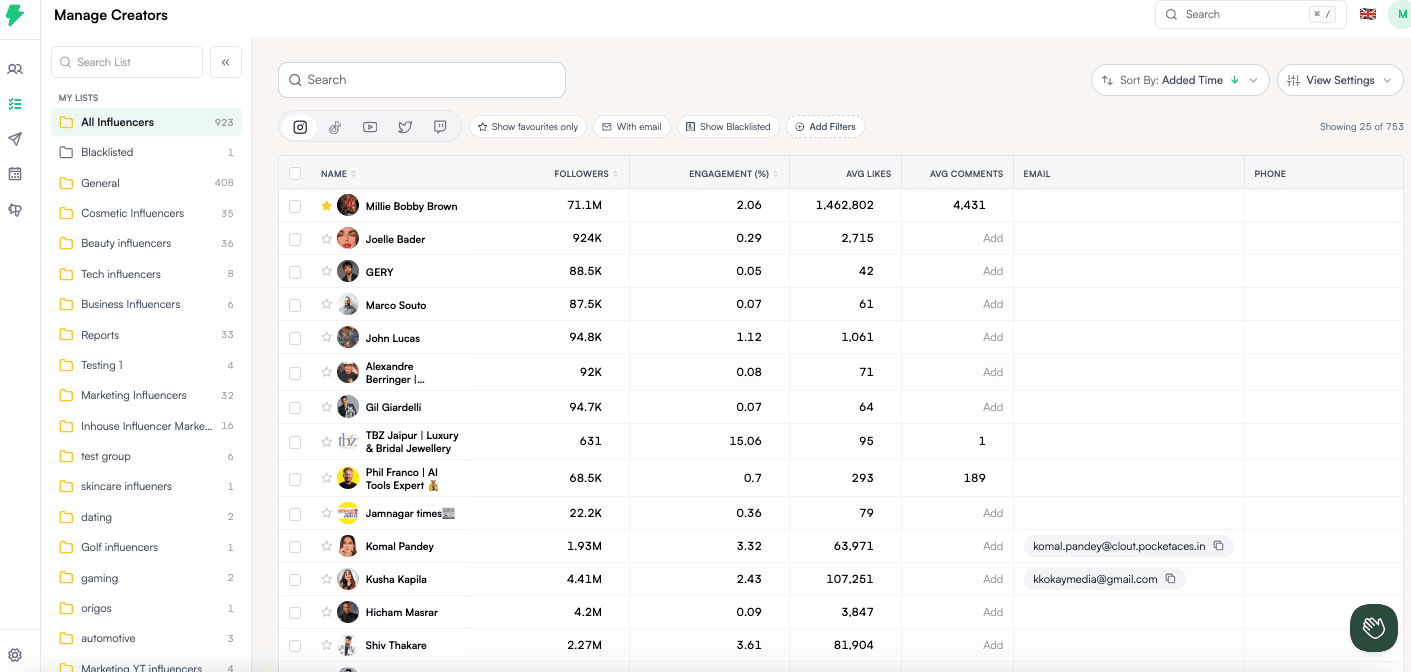
It also allows you to see all the lists from different campaigns and you can edit the columns as per your need. Impulze.ai list feature also has a blacklisted feature to make sure you can avoid creators you don’t want to work with again.
Read More: Top 22 Influencer Marketing Platforms in 2026
Step 3: Create the Core Creator Profile Fields
Every influencer database needs a clean creator profile section. This is the foundation.
Field | What to add |
|---|---|
Creator name | Full creator or channel name |
Primary handle | Main platform handle |
Platform | Instagram, TikTok, YouTube |
Profile URL | Direct link to profile |
Niche | Beauty, fitness, parenting, food, gaming |
Sub niche | Acne skincare, home workouts, vegan recipes |
Country | Creator location |
City or region | Useful for local campaigns |
Language | Content language |
Follower count | Current audience size |
Average views | Important for TikTok and YouTube |
Engagement rate | Helps compare quality |
Content format | Reels, Shorts, long videos, Stories |
Posting frequency | Active, moderate, inactive |
Brand safety notes | Anything risky or sensitive |
Source | Where you found the creator |
Practical example
If you are building a list for a skincare brand, do not just tag every creator as “beauty.”
Use more specific tags such as acne care, sensitive skin, dermatologist-backed skincare, budget skincare, clean beauty, or makeup and skincare hybrid.
These smaller tags make your database much easier to filter later. For example, if your next campaign is for an acne serum, you can quickly find creators who already talk about acne care instead of reviewing every beauty creator from scratch.
Step 4: Add Audience Fit Fields
This is where many influencer databases stay weak. A creator can look perfect on the surface but still have the wrong audience.
For example, a creator may be based in the United States, but most of their audience may be from another country. Or they may create skincare content but attract mostly other creators instead of real buyers.
Add audience fit fields like:
Top audience country: Helps you check whether the creator’s audience matches your campaign market.
Top audience city: Useful for local campaigns, store launches, events, or region specific promotions.
Audience age range: Helps you see if the creator’s followers match your buyer persona.
Audience gender split: Useful when your product is built for a specific customer group.
Audience language: Important when your campaign message needs to land in a specific language.
Audience interests: Helps you understand if the audience actually cares about your category.
Follower quality: Helps you avoid creators with fake followers or low-quality audiences.
Comment quality: Shows whether the audience is relevant, engaged, and genuinely interested.
Engagement consistency: Helps you avoid choosing a creator based on one viral post.
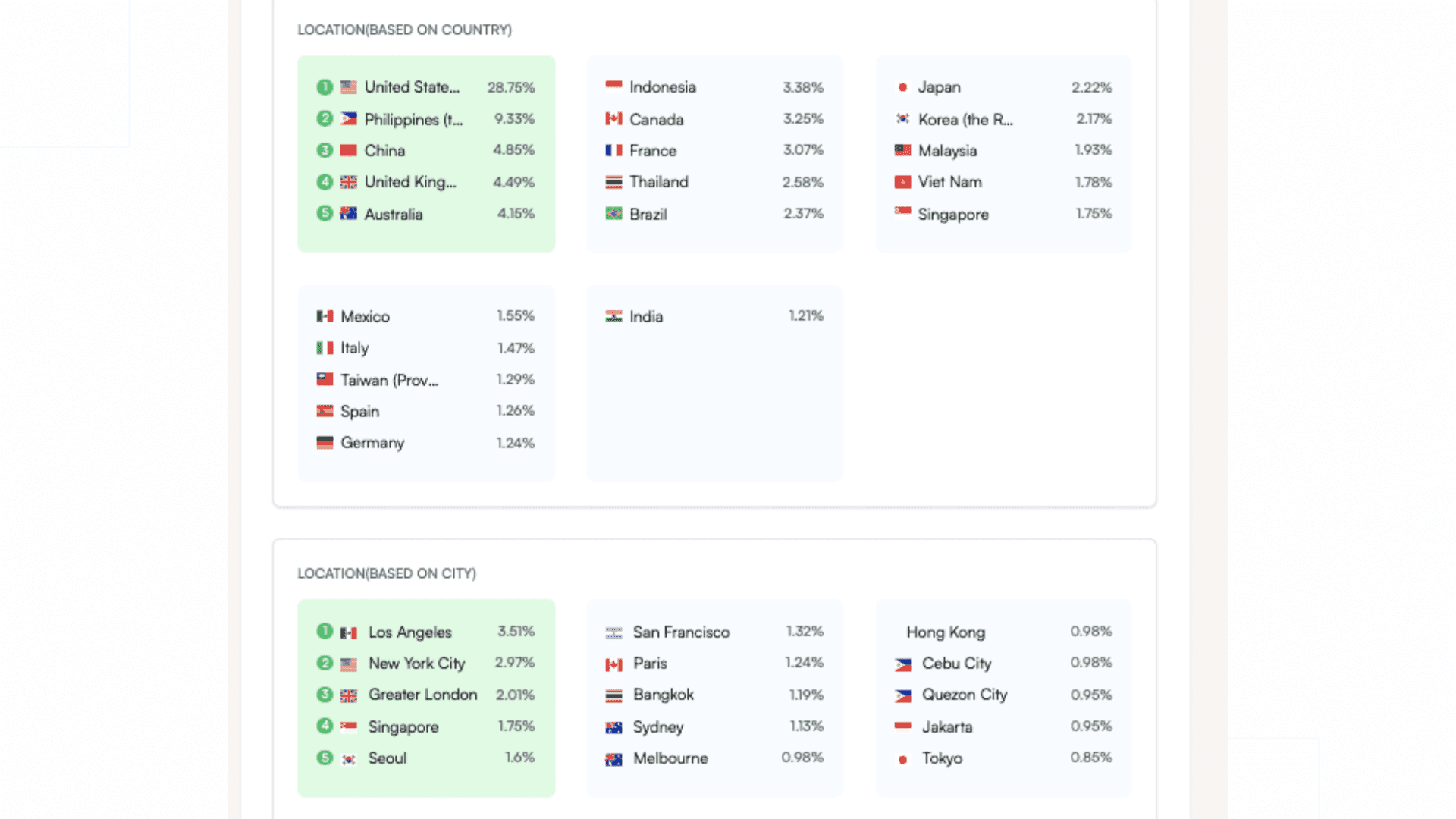
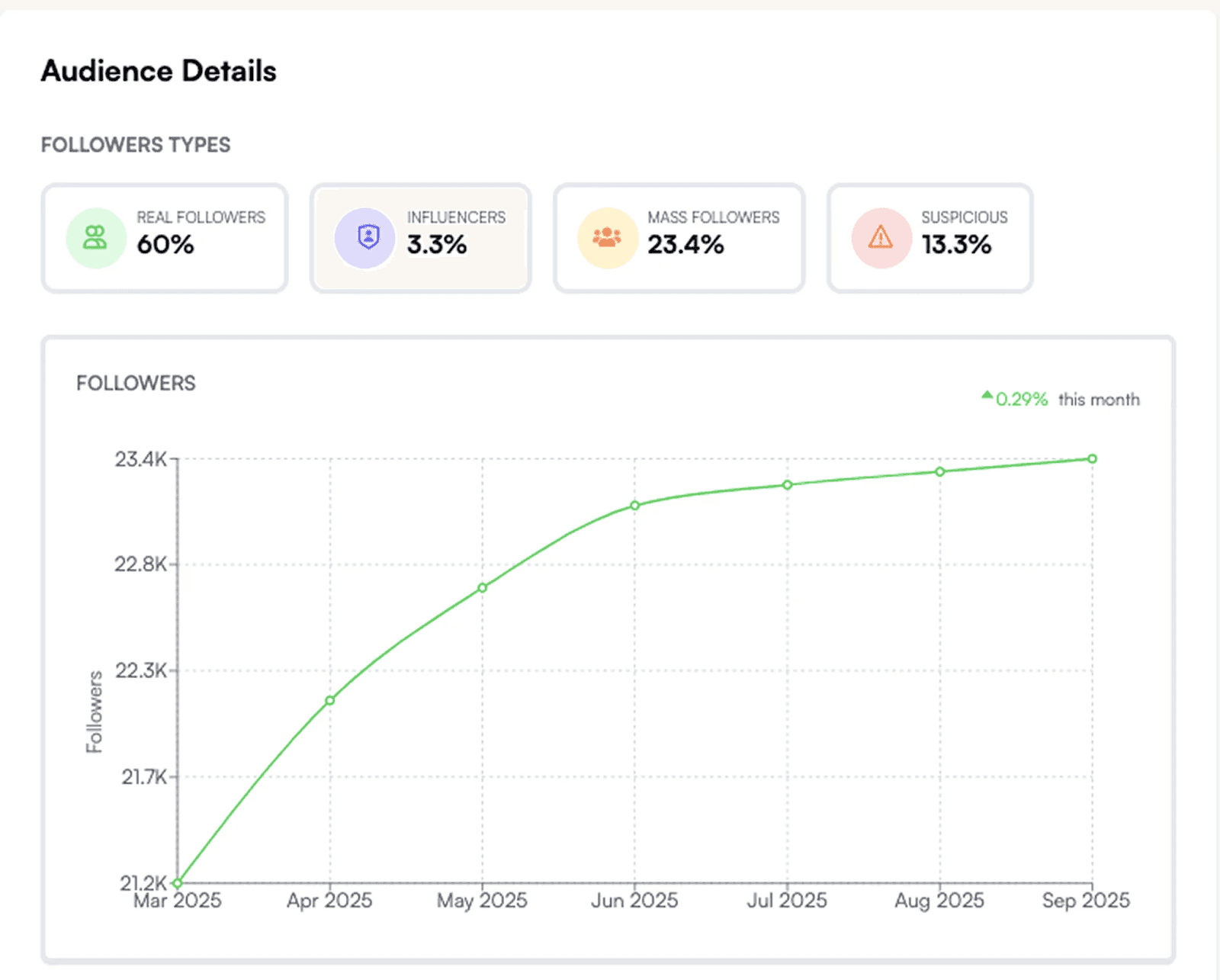
Pro Tip: To get a deep insight into audience demographics, simply download the influencer report on platforms like impulze.ai, and you can get detailed information within a few seconds.
Add a simple audience fit score
A simple scoring system helps your team compare creators more objectively instead of choosing based on follower count or personal preference.
Use a 1 to 5 score, where:
1 = Poor fit
2 = Weak fit
3 = Acceptable fit
4 = Strong fit
5 = Excellent fit
For example, if a DTC skincare brand in the United States is reviewing a creator, the scoring could look like this:
Audience location: 5
Audience age match: 4
Content relevance: 5
Engagement quality: 4
Brand tone fit: 5
That gives the creator a total score of 23 out of 25, making them a strong priority for the shortlist. This keeps creator selection more consistent, especially when multiple people are reviewing profiles.
Step 5: Add Contact and Outreach Fields
If your database does not track outreach, it will fall apart quickly. You need an influencer outreach tracker built into the database so your team always knows where each conversation stands. Include fields like:
Email address to store the creator’s contact details
Contact source so you know whether the email came from their bio, website, agency, platform, or a discovery tool
Contact type to identify whether you are speaking with the creator, their manager, or an agent
Outreach owner so there is clear accountability within the team
First contacted date to track when outreach started
Last contacted date to see the most recent interaction
Follow up date so no conversation gets forgotten
Outreach stage to track progress
Reply status to quickly understand the creator’s response
Notes for important conversation context
Gmail thread link if your team wants quick access to the actual conversation
Recommended outreach stages
Use clear stages instead of vague notes like “talking” or “pending.”
A clean workflow could look like this:
Not contacted → Creator has been added, but no outreach has started
Contacted → First message has been sent
Follow up due → No reply yet, and the next touchpoint is due
Replied → Creator has responded
Interested → Creator wants campaign details
Negotiating → Pricing, scope, or deliverables are being discussed
Approved → Creator is confirmed for the campaign
Rejected → Creator is not a fit for this campaign
On hold → Possible fit later, but not right now
Completed → Collaboration has been finished
The goal is simple. Anyone on your team should be able to open the database and understand the exact status of a creator within seconds.
Step 6: Add Campaign Organization Fields
Now you need to organize influencers for campaign work. This is where the keyword how to organize influencers for a campaign comes in naturally. A creator may be a great fit for one campaign and a poor fit for another. So your database should separate creator profile quality from campaign fit.
Add campaign fields like:
Campaign name: Example: Spring skincare launch.
Campaign goal: Mention whether the goal is awareness, sales, UGC, app installs, email signups, or brand trust.
Product promoted: Mention the exact product, bundle, collection, or service being promoted.
Campaign market: Add the target market, such as the United States, the United Kingdom, India, Canada, or a specific city.
Campaign platform: Mention Instagram, TikTok, YouTube, or a mix of platforms.
Creator role: Define whether the creator is doing a review, tutorial, unboxing, comparison, giveaway, or product integration.
Shortlist status: Use simple statuses like new, reviewed, approved, backup, or rejected.
Assigned teammate: Add the person responsible for reviewing or contacting the creator.
Brief sent: Mark whether the creator has received the campaign brief.
Contract sent: Track whether the agreement has been shared.
Product shipped: Track whether the product has been sent.
Draft received: Track whether the creator has submitted content for review.
Content approved: Mark whether the content is ready to post.
Post live: Track whether the content has gone live.
Post URL: Add the live content link once it is published.
Read More: How to Create an Influencer Brief in 2026 (Free Template Inside)
Step 7: Add Deliverable Tracking Fields
Influencer campaigns fail when content deadlines are unclear. So make sure you add fields that help your team track what each creator needs to produce.
You can include details like deliverable type, due date, number of deliverable, posting date, caption details, discount code, tracking links, usage rights, and so on.
<h5>Practical Tip:
Do not write vague deliverables like “Instagram content.” Use specific deliverables. For example:
Instead of “Instagram content,” write “1 Reel and 3 Stories.”
Instead of “TikTok video,” write “1 organic TikTok tutorial.”
Instead of “YouTube mention,” write “60 second integration in the first 5 minutes.”
Instead of “UGC,” write “3 raw vertical videos with 6 month usage rights.”
Specific deliverables prevent confusion later.
Step 8: Add Rate and Negotiation Fields
If you manage creator pricing in random email threads, you will lose context fast.
Your database should clearly show the creator’s first quoted rate, the final agreed rate, and the currency, especially if you work with creators across different countries. It should also mention what deliverables are included in that price, such as one Reel, three Stories, a TikTok video, or a YouTube integration.
You should also track extra costs like usage rights and exclusivity. This is important if you plan to reuse the creator’s content for organic posts, paid ads, or whitelisting. For competitive categories like skincare, fashion, supplements, food, or fitness, exclusivity can also affect pricing.
Along with that, record whether the creator is receiving free products, whether they are open to affiliate payment, and whether the payment is pending, paid, or overdue. Keep invoice details, payment terms, and special conditions in the same place so your team does not have to search through old email threads later.
Example
A creator quotes $1,500 for one Reel.
After negotiation, the final agreement may look like this:
Deliverables include 1 Reel and 3 Stories.
Final rate is $1,200.
Usage rights include 3 months of organic usage.
Paid ad usage is not included.
Exclusivity is not included.
Payment terms are 50 percent upfront and 50 percent after posting.
This context should stay in your database. It should not be buried in someone’s inbox.
Step 9: Add Performance Tracking Fields
A good influencer database should become more useful after every campaign.
That only happens when you connect each creator to actual campaign outcomes. Influencer.in’s 2025 report found that brands are tracking beyond likes and reach. It reported that 83 percent of brands track ROI using custom links, coupon codes, and affiliate dashboards, while 50 percent said influencer marketing delivers better or equivalent ROI compared to digital performance ads.
So your database should not stop at “creator posted.” It should show what happened after the content went live.
Track performance details like:
Post URL so your team can quickly open the live content
Impressions and views to understand reach and video performance
Likes, comments, saves, and shares to measure engagement quality
Link clicks to see how much traffic the creator drove
Coupon code uses to connect creator activity to sales
Revenue to track sales generated from the campaign
Cost per engagement, cost per click, and cost per acquisition to compare efficiency
ROI to understand whether the creator was worth the spend
Content quality score to rate how useful the final content was
Creator reliability score to track how easy they were to work with
Rehire status to decide whether to work with them again
You can track all of this inside impulze.ai, so your team does not have to jump between spreadsheets, live post links, tracking sheets, and reporting decks. It keeps creator performance connected to the same workflow where you discover, shortlist, manage, and review influencers.
Also, make sure you do not track only vanity metrics. Follower count is useful for context, but it should not be your main decision metric.
A creator with 25,000 followers and a strong audience fit can outperform a creator with 250,000 followers and weak relevance.
Track the numbers that match your campaign goal.
For awareness campaigns, focus on reach, impressions, and views.
For engagement campaigns, track likes, comments, saves, and shares.
For traffic campaigns, measure link clicks and click-through rate.
For sales campaigns, track coupon uses, revenue, and CPA.
For UGC campaigns, review content quality, usage rights, and edit flexibility.
For community growth campaigns, look at new followers, comments, and DMs.
For long-term partnerships, track reliability, brand fit, posting quality, and repeat performance.
Step 10: Add Relationship Notes
Influencer marketing is relationship-based. Your database should help your team remember the human side, too. Add relationship fields like:
Preferred name: Use the name the creator prefers in communication.
Manager name: Add this if the creator works through a manager or agency.
Preferred contact method: Mention whether they prefer email, Instagram DM, or manager communication.
Communication style: For example, fast replies, prefers short briefs, needs detailed instructions, or likes clear timelines.
Past feedback: Record useful notes like “loved the product texture” or “asked for more creative freedom.”
Collaboration notes: Add details like lead time, posting preferences, content strengths, or review process.
Do not contact reason: Use this when a creator is not aligned with your brand values or campaign category.
Recontact date: Add a future date if the creator is interested later.
Relationship strength: Use simple tags like new, warm, active, paused, or priority partner.
These notes make future outreach more personal. They also help your team avoid awkward situations, like pitching the same creator after they already said the product is not relevant.
Download Influencer Marketing Spreadsheet Template For Free
Small Team vs Scaling Team: What Changes?
The right influencer list management setup depends on your campaign volume. Here is one to help you:
Stage | What usually works | What starts breaking |
|---|---|---|
1 to 20 creators | Simple spreadsheet | Manual updates are still manageable |
20 to 100 creators | Structured database with outreach fields | Duplicate outreach starts appearing |
100 to 500 creators | Database plus CRM style workflow | Manual updates become unreliable |
500 plus creators | Influencer platform with discovery, outreach, tracking, and reporting | Spreadsheets become too slow and risky |
If your team is still in the first stage, start with a clean database template.
If you are running monthly campaigns, working with agencies, managing multiple products, or reporting to leadership, you need a system that connects creator discovery with campaign execution.
Spreadsheet vs Influencer CRM: Which One Should You Use?
A spreadsheet is not bad. It is often the best place to start. But it has limits.
Use a spreadsheet if:
You are just starting
You run occasional campaigns
You have a small creator pool
One person owns the full workflow
You do not need advanced analytics
You are comfortable updating everything manually
Use an influencer CRM or platform if:
You manage multiple campaigns
You work with many creators
You need outreach tracking
You need audience analysis
You need campaign reporting
You want to reduce manual work
You have multiple people involved
You need to prove ROI
You want to avoid duplicate outreach
You want one place for discovery, outreach, tracking, and reporting
For growing teams, the better question is:
At what point does manual tracking cost more than the tool?
If your team spends hours every week finding profiles, checking audience fit, hunting emails, updating statuses, and building reports, the database is already becoming operational debt.
How impulze.ai Helps With Influencer List Management
This section should not be read as “you must use a tool.” You can start with a spreadsheet if your campaign is small. But once you need to scale, impulze.ai helps solve the parts that usually break.
1. Creator discovery: Instead of manually collecting profiles from social platforms, you can search 400+ million creators across Instagram, TikTok, and YouTube using filters like niche, location, audience, engagement, and platform.
This helps you build a better creator database from the start.
2. Influencer analytics: Before adding a creator to your shortlist, you can review audience quality, engagement, content style, and profile performance. This reduces the chance of adding creators who look good but do not match your campaign.
3. Shortlisting and campaign organization: You can save creators into lists and organize them by campaign, niche, market, product, or priority. That makes influencer list management easier than working through disconnected tabs.
4. Contact discovery and outreach: You can find creator contact details and manage outreach workflows without switching between too many tools. This is useful when you are contacting dozens or hundreds of creators.
5. Campaign tracking: Once creators are approved, you can manage campaign details, content status, and performance tracking in one place. This helps your list become a real campaign system.
6. Reporting: Instead of manually copying data into reports, you can track campaign performance and understand which creators are worth working with again. That final piece matters because an influencer database should improve with every campaign.
Final Thoughts
Here is a simple question to leave with:
If your next campaign started tomorrow, would your current influencer list help your team move faster, or would it create more work?
Because that is the real test. A useful influencer database should not make your team search old emails, check five tabs, ask who contacted whom, or guess why a creator was added in the first place. It should give your team the context they need to move with confidence.
Who fits the campaign?
Who has already been contacted?
Who replied?
Who quoted too high?
Who posted on time?
Who actually drove results?
If your database cannot answer those questions, it may still be a list, but it is not ready to support scale.
Start simple if your campaigns are small. But as your creator program grows, your list needs to grow with it.
With impulze.ai, you can discover, analyze, shortlist, contact, manage, and track influencers across Instagram, TikTok, and YouTube from one place, so your team is not rebuilding context every time a new campaign starts.
Ready to build influencer lists that your team can actually use at scale? Try impulze.ai and start discovering better creators faster.
Most influencer lists start the same way.
Someone opens a spreadsheet, adds a creator name, pastes an Instagram handle, adds follower count, maybe adds an email, and calls it a database. This can work for the first few campaigns.
Then the list grows.
One creator appears in three tabs. Someone forgets who already reached out. A teammate adds an old email. A creator who performed well last quarter gets lost in the sheet. Another creator gets contacted twice by two different people. Campaign results live in a separate report. Outreach lives in Gmail. Content links live in Slack. Payment notes live in someone’s memory.
That is when an influencer list stops being useful.
The problem is not the spreadsheet itself. The problem is that most influencer databases are built as static lists, not campaign systems.
If you want to build an influencer database that actually supports growth, it needs to help your team answer simple questions fast:
Who is this creator?
Are they a good fit for this campaign?
Have we contacted them before?
Did they reply?
What did they quote?
What content did they post?
How did they perform?
Should we work with them again?
This guide walks through how to build and manage an influencer database that works beyond the first campaign.
What Is an Influencer Database?
An influencer database is a structured system where brands and agencies store, organize, evaluate, contact, and track creators for influencer marketing campaigns.
A basic influencer database may include:
Field | Example |
|---|---|
Creator name | Sarah Lee |
Platform | |
Handle | @sarahbeauty |
Niche | Skincare |
Country | United States |
Follower count | 85,000 |
Engagement rate | 3.8 percent |
Campaign fit | High |
Outreach status | Replied |
Quoted rate | $800 |
Past performance | Strong saves and link clicks |
But a useful influencer database goes beyond profile details. It should also show relationship history, outreach progress, campaign status, content deadlines, performance metrics, and notes that help your team make better decisions later.
A good way to understand is this:
A basic influencer list stores creator details. A strong influencer database helps you decide who to contact, when to follow up, who to prioritize, and who is worth working with again.
Why Most Influencer Lists Fall Apart
Influencer list management usually breaks when the team starts scaling. Here are the most common reasons.
1. The list has too many creators but not enough context
A creator name and handle are not enough. At scale, your team needs to know why that creator was added.
Was it because of the audience fit? Content quality? Past performance? Competitor collaboration? Location? Engagement? Niche relevance?
Without context, every shortlist becomes another round of manual checking.
2. The same creator gets added multiple times
This happens all the time. One teammate adds the Instagram profile. Another adds the TikTok profile. Someone else adds the YouTube channel. Then the same creator appears under slightly different names.
That creates confusion during outreach and reporting. Duplicate creators can create problems like:
Two teammates contacting the same creator: This makes the brand look unorganized and can hurt the relationship before it even starts.
Different rates being recorded for the same creator: One teammate may see an old quote while another negotiates a new one, which makes pricing messy.
Campaign history getting split across different rows: Past performance becomes harder to trust because the full creator history is not in one place.
A creator being rejected once and approved later without context: Your team may repeat the same review process because there is no clear decision record.
A scalable influencer database needs duplicate checks and unified creator profiles, so every creator has one clean record your team can trust.
3. Outreach status is unclear
This is where influencer outreach tracker fields become important. If you do not track outreach properly, your team will not know:
Who was contacted
When they were contacted
Which email was used
Who owns the conversation
Whether a follow up is due
What the creator replied
Whether the creator said yes, no, later, or quoted too high
Without outreach tracking, the list becomes a graveyard of names.
4. Campaign details are stored separately
Many teams keep creator lists in one sheet, outreach in Gmail, deliverables in another tracker, and results in a reporting deck. This creates a broken workflow.
The creator database should connect to campaign work. For example, if you ran a skincare campaign with 50 creators, you should be able to quickly see who was shortlisted, who got approved, who posted on time, who missed deadlines, who drove saves, clicks, sales, or engagement, and who is worth inviting again.
If this information is scattered, campaign learning gets lost.
5. The list is not updated
Creator data changes quickly. Follower count changes. Engagement changes. Email addresses change. Content direction changes. Audience location changes. Rates change. Brand safety concerns can appear later.
A database that is not updated becomes risky. Before every campaign, you should refresh key creator data instead of relying on what someone added six months ago.
6. Performance history is missing
This is one of the biggest gaps.
Many brands build influencer lists for outreach, but they do not connect the list to performance. That means they keep asking the same questions again:
Did this creator perform well last time?
Were their comments authentic?
Did their audience click?
Did their content get saved?
Did the content need too many edits?
Were they easy to work with?
Did they post on time?
The best influencer database becomes smarter after every campaign.
Why Influencer List Management Matters More as Campaigns Scale
Influencer marketing is no longer just about finding a few popular creators.
Brands are building larger creator programs, testing micro-influencers, using performance links, running affiliate campaigns, and tracking content across platforms.
According to Sprout Social, 59 percent of marketers planned to partner with more influencers in 2025, while 76 percent of C suite executives reported growing influencer budgets. The same summary reported that 83 percent of marketers say sponsored influencer content generates more conversions than brand organic posts.
That growth creates an operational problem.
More creators means more profiles to review, more emails to send, more briefs to manage, more deliverables to track, and more performance data to compare.
The Influencer Marketing Hub 2026 Benchmark Report also frames influencer marketing as a channel where budgets are rising, expectations are tightening, and measurement is becoming sharper. It notes that scaling is no longer about finding a few good creators, but building an operating system that can handle cost, credibility, and performance scrutiny.
That is why influencer list management matters.
Your creator list holds the details, decisions, conversations, and campaign history that keep your influencer marketing workflow moving smoothly.
How to Build an Influencer Database From Scratch
Here is a practical step-by-step way to build an influencer database that can support real campaigns.
Step 1: Define the Purpose of Your Influencer Database
Before adding creators, decide what your database is supposed to help you do. Most teams skip this and start collecting profiles too early.
Ask these questions first:
Are you building the database for one campaign or for future campaigns too?
A long term database needs more fields because you will want to reuse creator details later.Are you tracking only discovery, or do you want to manage the full campaign workflow?
If outreach, deliverables, and reporting are involved, your database needs separate fields for each stage.Will multiple teammates use the same database?
If yes, add ownership and status fields so everyone knows who is handling what.Are you working with creators across Instagram, TikTok, and YouTube?
If yes, create unified creator profiles instead of treating each platform as a separate record.Do you care about ROI tracking?
If yes, include performance fields like clicks, sales, revenue, cost per engagement, and rehire status.Do you plan to work with the same creators again?
If yes, track relationship history, past campaign notes, and recontact dates.
If the goal is only to shortlist 20 creators for one campaign, a simple sheet may work. But if you want to manage influencer marketing as a repeatable growth channel, you need a deeper structure.
Step 2: Choose Your Database Format
There are three common ways to manage your influencer database.
Spreadsheet
Best for:
Small teams, early campaigns, and simple creator shortlists.
Limitations:
It can get messy as campaigns grow. Duplicate creators, outdated statuses, missed follow-ups, and scattered performance data become harder to manage.
Notion or Airtable-style system
Best for:
Teams that want more structure with tags, filters, views, and campaign-specific boards.
Limitations:
It still needs a lot of manual updates. Creator data, outreach status, and campaign results can become outdated if the team does not maintain it regularly.
Influencer marketing platform
Best for:
Brands and agencies scaling creator discovery, influencer analytics, outreach, campaign tracking, and reporting often use influencer marketing platforms.
Limitations:
Your team needs to adopt the tool properly so the workflow stays clean and consistent.
That being said. If you use platforms like impulze.ai where the list management is quite easy to manage and looks like a spreadsheet but inside your influencer marketing platform where all your data – from creator analytics to campaign metrics – lives inside the platform, it is much easier to navigate and track the sheet.
It also allows you to see all the lists from different campaigns and you can edit the columns as per your need. Impulze.ai list feature also has a blacklisted feature to make sure you can avoid creators you don’t want to work with again.
Read More: Top 22 Influencer Marketing Platforms in 2026
Step 3: Create the Core Creator Profile Fields
Every influencer database needs a clean creator profile section. This is the foundation.
Field | What to add |
|---|---|
Creator name | Full creator or channel name |
Primary handle | Main platform handle |
Platform | Instagram, TikTok, YouTube |
Profile URL | Direct link to profile |
Niche | Beauty, fitness, parenting, food, gaming |
Sub niche | Acne skincare, home workouts, vegan recipes |
Country | Creator location |
City or region | Useful for local campaigns |
Language | Content language |
Follower count | Current audience size |
Average views | Important for TikTok and YouTube |
Engagement rate | Helps compare quality |
Content format | Reels, Shorts, long videos, Stories |
Posting frequency | Active, moderate, inactive |
Brand safety notes | Anything risky or sensitive |
Source | Where you found the creator |
Practical example
If you are building a list for a skincare brand, do not just tag every creator as “beauty.”
Use more specific tags such as acne care, sensitive skin, dermatologist-backed skincare, budget skincare, clean beauty, or makeup and skincare hybrid.
These smaller tags make your database much easier to filter later. For example, if your next campaign is for an acne serum, you can quickly find creators who already talk about acne care instead of reviewing every beauty creator from scratch.
Step 4: Add Audience Fit Fields
This is where many influencer databases stay weak. A creator can look perfect on the surface but still have the wrong audience.
For example, a creator may be based in the United States, but most of their audience may be from another country. Or they may create skincare content but attract mostly other creators instead of real buyers.
Add audience fit fields like:
Top audience country: Helps you check whether the creator’s audience matches your campaign market.
Top audience city: Useful for local campaigns, store launches, events, or region specific promotions.
Audience age range: Helps you see if the creator’s followers match your buyer persona.
Audience gender split: Useful when your product is built for a specific customer group.
Audience language: Important when your campaign message needs to land in a specific language.
Audience interests: Helps you understand if the audience actually cares about your category.
Follower quality: Helps you avoid creators with fake followers or low-quality audiences.
Comment quality: Shows whether the audience is relevant, engaged, and genuinely interested.
Engagement consistency: Helps you avoid choosing a creator based on one viral post.
Pro Tip: To get a deep insight into audience demographics, simply download the influencer report on platforms like impulze.ai, and you can get detailed information within a few seconds.
Add a simple audience fit score
A simple scoring system helps your team compare creators more objectively instead of choosing based on follower count or personal preference.
Use a 1 to 5 score, where:
1 = Poor fit
2 = Weak fit
3 = Acceptable fit
4 = Strong fit
5 = Excellent fit
For example, if a DTC skincare brand in the United States is reviewing a creator, the scoring could look like this:
Audience location: 5
Audience age match: 4
Content relevance: 5
Engagement quality: 4
Brand tone fit: 5
That gives the creator a total score of 23 out of 25, making them a strong priority for the shortlist. This keeps creator selection more consistent, especially when multiple people are reviewing profiles.
Step 5: Add Contact and Outreach Fields
If your database does not track outreach, it will fall apart quickly. You need an influencer outreach tracker built into the database so your team always knows where each conversation stands. Include fields like:
Email address to store the creator’s contact details
Contact source so you know whether the email came from their bio, website, agency, platform, or a discovery tool
Contact type to identify whether you are speaking with the creator, their manager, or an agent
Outreach owner so there is clear accountability within the team
First contacted date to track when outreach started
Last contacted date to see the most recent interaction
Follow up date so no conversation gets forgotten
Outreach stage to track progress
Reply status to quickly understand the creator’s response
Notes for important conversation context
Gmail thread link if your team wants quick access to the actual conversation
Recommended outreach stages
Use clear stages instead of vague notes like “talking” or “pending.”
A clean workflow could look like this:
Not contacted → Creator has been added, but no outreach has started
Contacted → First message has been sent
Follow up due → No reply yet, and the next touchpoint is due
Replied → Creator has responded
Interested → Creator wants campaign details
Negotiating → Pricing, scope, or deliverables are being discussed
Approved → Creator is confirmed for the campaign
Rejected → Creator is not a fit for this campaign
On hold → Possible fit later, but not right now
Completed → Collaboration has been finished
The goal is simple. Anyone on your team should be able to open the database and understand the exact status of a creator within seconds.
Step 6: Add Campaign Organization Fields
Now you need to organize influencers for campaign work. This is where the keyword how to organize influencers for a campaign comes in naturally. A creator may be a great fit for one campaign and a poor fit for another. So your database should separate creator profile quality from campaign fit.
Add campaign fields like:
Campaign name: Example: Spring skincare launch.
Campaign goal: Mention whether the goal is awareness, sales, UGC, app installs, email signups, or brand trust.
Product promoted: Mention the exact product, bundle, collection, or service being promoted.
Campaign market: Add the target market, such as the United States, the United Kingdom, India, Canada, or a specific city.
Campaign platform: Mention Instagram, TikTok, YouTube, or a mix of platforms.
Creator role: Define whether the creator is doing a review, tutorial, unboxing, comparison, giveaway, or product integration.
Shortlist status: Use simple statuses like new, reviewed, approved, backup, or rejected.
Assigned teammate: Add the person responsible for reviewing or contacting the creator.
Brief sent: Mark whether the creator has received the campaign brief.
Contract sent: Track whether the agreement has been shared.
Product shipped: Track whether the product has been sent.
Draft received: Track whether the creator has submitted content for review.
Content approved: Mark whether the content is ready to post.
Post live: Track whether the content has gone live.
Post URL: Add the live content link once it is published.
Read More: How to Create an Influencer Brief in 2026 (Free Template Inside)
Step 7: Add Deliverable Tracking Fields
Influencer campaigns fail when content deadlines are unclear. So make sure you add fields that help your team track what each creator needs to produce.
You can include details like deliverable type, due date, number of deliverable, posting date, caption details, discount code, tracking links, usage rights, and so on.
<h5>Practical Tip:
Do not write vague deliverables like “Instagram content.” Use specific deliverables. For example:
Instead of “Instagram content,” write “1 Reel and 3 Stories.”
Instead of “TikTok video,” write “1 organic TikTok tutorial.”
Instead of “YouTube mention,” write “60 second integration in the first 5 minutes.”
Instead of “UGC,” write “3 raw vertical videos with 6 month usage rights.”
Specific deliverables prevent confusion later.
Step 8: Add Rate and Negotiation Fields
If you manage creator pricing in random email threads, you will lose context fast.
Your database should clearly show the creator’s first quoted rate, the final agreed rate, and the currency, especially if you work with creators across different countries. It should also mention what deliverables are included in that price, such as one Reel, three Stories, a TikTok video, or a YouTube integration.
You should also track extra costs like usage rights and exclusivity. This is important if you plan to reuse the creator’s content for organic posts, paid ads, or whitelisting. For competitive categories like skincare, fashion, supplements, food, or fitness, exclusivity can also affect pricing.
Along with that, record whether the creator is receiving free products, whether they are open to affiliate payment, and whether the payment is pending, paid, or overdue. Keep invoice details, payment terms, and special conditions in the same place so your team does not have to search through old email threads later.
Example
A creator quotes $1,500 for one Reel.
After negotiation, the final agreement may look like this:
Deliverables include 1 Reel and 3 Stories.
Final rate is $1,200.
Usage rights include 3 months of organic usage.
Paid ad usage is not included.
Exclusivity is not included.
Payment terms are 50 percent upfront and 50 percent after posting.
This context should stay in your database. It should not be buried in someone’s inbox.
Step 9: Add Performance Tracking Fields
A good influencer database should become more useful after every campaign.
That only happens when you connect each creator to actual campaign outcomes. Influencer.in’s 2025 report found that brands are tracking beyond likes and reach. It reported that 83 percent of brands track ROI using custom links, coupon codes, and affiliate dashboards, while 50 percent said influencer marketing delivers better or equivalent ROI compared to digital performance ads.
So your database should not stop at “creator posted.” It should show what happened after the content went live.
Track performance details like:
Post URL so your team can quickly open the live content
Impressions and views to understand reach and video performance
Likes, comments, saves, and shares to measure engagement quality
Link clicks to see how much traffic the creator drove
Coupon code uses to connect creator activity to sales
Revenue to track sales generated from the campaign
Cost per engagement, cost per click, and cost per acquisition to compare efficiency
ROI to understand whether the creator was worth the spend
Content quality score to rate how useful the final content was
Creator reliability score to track how easy they were to work with
Rehire status to decide whether to work with them again
You can track all of this inside impulze.ai, so your team does not have to jump between spreadsheets, live post links, tracking sheets, and reporting decks. It keeps creator performance connected to the same workflow where you discover, shortlist, manage, and review influencers.
Also, make sure you do not track only vanity metrics. Follower count is useful for context, but it should not be your main decision metric.
A creator with 25,000 followers and a strong audience fit can outperform a creator with 250,000 followers and weak relevance.
Track the numbers that match your campaign goal.
For awareness campaigns, focus on reach, impressions, and views.
For engagement campaigns, track likes, comments, saves, and shares.
For traffic campaigns, measure link clicks and click-through rate.
For sales campaigns, track coupon uses, revenue, and CPA.
For UGC campaigns, review content quality, usage rights, and edit flexibility.
For community growth campaigns, look at new followers, comments, and DMs.
For long-term partnerships, track reliability, brand fit, posting quality, and repeat performance.
Step 10: Add Relationship Notes
Influencer marketing is relationship-based. Your database should help your team remember the human side, too. Add relationship fields like:
Preferred name: Use the name the creator prefers in communication.
Manager name: Add this if the creator works through a manager or agency.
Preferred contact method: Mention whether they prefer email, Instagram DM, or manager communication.
Communication style: For example, fast replies, prefers short briefs, needs detailed instructions, or likes clear timelines.
Past feedback: Record useful notes like “loved the product texture” or “asked for more creative freedom.”
Collaboration notes: Add details like lead time, posting preferences, content strengths, or review process.
Do not contact reason: Use this when a creator is not aligned with your brand values or campaign category.
Recontact date: Add a future date if the creator is interested later.
Relationship strength: Use simple tags like new, warm, active, paused, or priority partner.
These notes make future outreach more personal. They also help your team avoid awkward situations, like pitching the same creator after they already said the product is not relevant.
Download Influencer Marketing Spreadsheet Template For Free
Small Team vs Scaling Team: What Changes?
The right influencer list management setup depends on your campaign volume. Here is one to help you:
Stage | What usually works | What starts breaking |
|---|---|---|
1 to 20 creators | Simple spreadsheet | Manual updates are still manageable |
20 to 100 creators | Structured database with outreach fields | Duplicate outreach starts appearing |
100 to 500 creators | Database plus CRM style workflow | Manual updates become unreliable |
500 plus creators | Influencer platform with discovery, outreach, tracking, and reporting | Spreadsheets become too slow and risky |
If your team is still in the first stage, start with a clean database template.
If you are running monthly campaigns, working with agencies, managing multiple products, or reporting to leadership, you need a system that connects creator discovery with campaign execution.
Spreadsheet vs Influencer CRM: Which One Should You Use?
A spreadsheet is not bad. It is often the best place to start. But it has limits.
Use a spreadsheet if:
You are just starting
You run occasional campaigns
You have a small creator pool
One person owns the full workflow
You do not need advanced analytics
You are comfortable updating everything manually
Use an influencer CRM or platform if:
You manage multiple campaigns
You work with many creators
You need outreach tracking
You need audience analysis
You need campaign reporting
You want to reduce manual work
You have multiple people involved
You need to prove ROI
You want to avoid duplicate outreach
You want one place for discovery, outreach, tracking, and reporting
For growing teams, the better question is:
At what point does manual tracking cost more than the tool?
If your team spends hours every week finding profiles, checking audience fit, hunting emails, updating statuses, and building reports, the database is already becoming operational debt.
How impulze.ai Helps With Influencer List Management
This section should not be read as “you must use a tool.” You can start with a spreadsheet if your campaign is small. But once you need to scale, impulze.ai helps solve the parts that usually break.
1. Creator discovery: Instead of manually collecting profiles from social platforms, you can search 400+ million creators across Instagram, TikTok, and YouTube using filters like niche, location, audience, engagement, and platform.
This helps you build a better creator database from the start.
2. Influencer analytics: Before adding a creator to your shortlist, you can review audience quality, engagement, content style, and profile performance. This reduces the chance of adding creators who look good but do not match your campaign.
3. Shortlisting and campaign organization: You can save creators into lists and organize them by campaign, niche, market, product, or priority. That makes influencer list management easier than working through disconnected tabs.
4. Contact discovery and outreach: You can find creator contact details and manage outreach workflows without switching between too many tools. This is useful when you are contacting dozens or hundreds of creators.
5. Campaign tracking: Once creators are approved, you can manage campaign details, content status, and performance tracking in one place. This helps your list become a real campaign system.
6. Reporting: Instead of manually copying data into reports, you can track campaign performance and understand which creators are worth working with again. That final piece matters because an influencer database should improve with every campaign.
Final Thoughts
Here is a simple question to leave with:
If your next campaign started tomorrow, would your current influencer list help your team move faster, or would it create more work?
Because that is the real test. A useful influencer database should not make your team search old emails, check five tabs, ask who contacted whom, or guess why a creator was added in the first place. It should give your team the context they need to move with confidence.
Who fits the campaign?
Who has already been contacted?
Who replied?
Who quoted too high?
Who posted on time?
Who actually drove results?
If your database cannot answer those questions, it may still be a list, but it is not ready to support scale.
Start simple if your campaigns are small. But as your creator program grows, your list needs to grow with it.
With impulze.ai, you can discover, analyze, shortlist, contact, manage, and track influencers across Instagram, TikTok, and YouTube from one place, so your team is not rebuilding context every time a new campaign starts.
Ready to build influencer lists that your team can actually use at scale? Try impulze.ai and start discovering better creators faster.
Frequently Asked Questions
What is an influencer database?

What is an influencer database?
How do I build influencer database from scratch?
How do I build influencer database from scratch?
What should I include in an influencer list?
What should I include in an influencer list?
How do I organize influencers for campaign work?
How do I organize influencers for campaign work?
Can I manage influencer lists in a spreadsheet?
Can I manage influencer lists in a spreadsheet?
When should I move from a spreadsheet to an influencer CRM?
When should I move from a spreadsheet to an influencer CRM?
What is the difference between an influencer database and an influencer CRM?
What is the difference between an influencer database and an influencer CRM?
Author Bio
Author Bio
Rashmi Singh
Rashmi Singh
Rashmi Singh is a writer and strategist with more than 7 years of experience. When not writing, she is either spending time with her friends or planning her next trip. You can learn more about her here.
Rashmi Singh is a writer and strategist with more than 7 years of experience. When not writing, she is either spending time with her friends or planning her next trip. You can learn more about her here.
We Also Recommend To Read